6. Text Editor with CTkTextbox
CTkTextbox
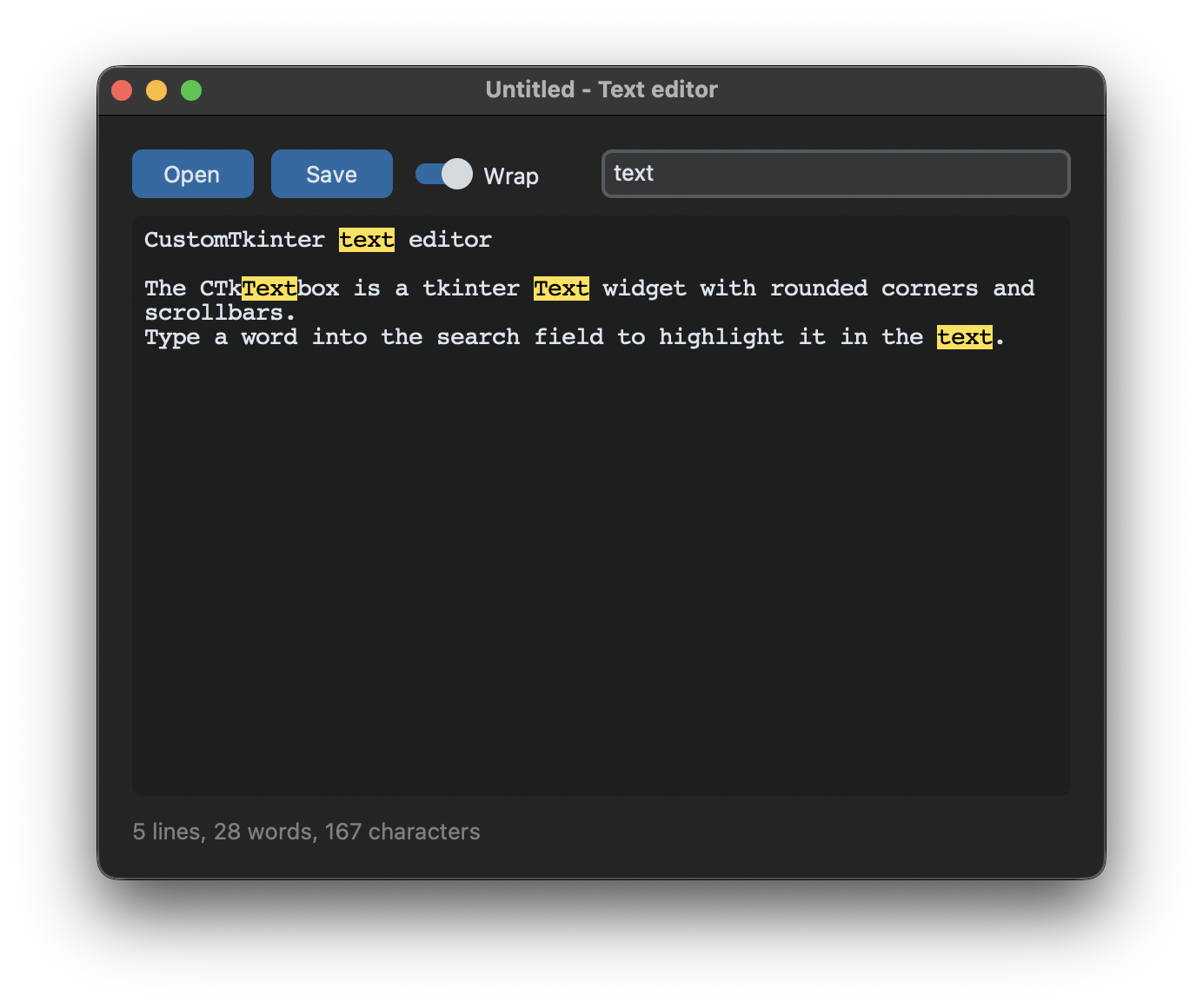
A CTkTextbox is a tkinter Text widget with rounded corners and scrollbars that appear when they are needed. All arguments and methods of tkinter.Text work as well, like wrap and undo:
self.textbox = customtkinter.CTkTextbox(self, wrap="word", undo=True,
                                        font=customtkinter.CTkFont(family="Courier", size=14))
wrap="word" breaks long lines between words, the default "char" breaks them anywhere and "none" doesn't break them at all, then a horizontal scrollbar appears. With undo=True the user can undo changes with Ctrl+Z, or Cmd+Z on macOS.
Indexes
A position in the text is given as a string "line.column". Lines start at 1 and columns at 0, so "1.0" is the beginning of the text. Other indexes are "end" for the end of the text and "insert" for the position of the cursor, and they can be moved with + and -, for example "1.0+5c" is five characters after the beginning:
self.textbox.insert("1.0", text)  # insert at the beginning
self.textbox.delete("1.0", "end")  # delete everything
text = self.textbox.get("1.0", "end-1c")  # get everything
The textbox always has a newline at the end. get("1.0", "end") returns the text with this extra newline, "end-1c" stops one character before. index() converts an index into the "line.column" form, self.textbox.index("end-1c") returns the position of the last character and with it the number of lines.
Unsaved changes
The textbox sends the virtual event <<Modified>> when its modified flag changes from false to true. To get notified about every change, the flag is reset to false each time:
self.textbox.bind("<<Modified>>", self.text_modified)

def text_modified(self, event=None):
    if self.textbox.edit_modified():
        self.textbox.edit_modified(False)
        self.unsaved = True
        self.search()
        self.update_status()
Resetting the flag sends <<Modified>> again, then edit_modified() returns False and the function does nothing. self.unsaved stores if there are changes that are not saved yet, the title of the window shows a * in this case.
Highlight text with tags
A tag gives a part of the text its own colors. The tag is configured once with tag_config() and then added to ranges of the text with tag_add(). To find a word, search() returns the index of the next match or an empty string:
self.textbox.tag_config("found", background="#FDE047", foreground="black")

start = "1.0"
while True:
    start = self.textbox.search(word, start, stopindex="end", nocase=True)
    if not start:
        break
    end = f"{start}+{len(word)}c"
    self.textbox.tag_add("found", start, end)
    start = end
tag_remove("found", "1.0", "end") removes the highlight again, and see(index) scrolls the textbox to the first match.
Open and save files
The file dialogs of tkinter return the chosen path, or an empty string if the dialog was cancelled. Files are opened with encoding="utf-8", so that umlauts and other characters work on every system:
path = filedialog.askopenfilename(filetypes=[("Text files", "*.txt"), ("All files", "*.*")])
if path:
    with open(path, encoding="utf-8") as file:
        text = file.read()
After a new text is loaded, edit_reset() clears the undo history, so the user can't undo the loading of the file.
Full code
import os
import sys
from tkinter import filedialog
import customtkinter

MODIFIER = "Command" if sys.platform == "darwin" else "Control"

EXAMPLE_TEXT = """CustomTkinter text editor

The CTkTextbox is a tkinter Text widget with rounded corners and scrollbars.
Type a word into the search field to highlight it in the text.
"""


class App(customtkinter.CTk):
    def __init__(self):
        super().__init__()

        self.geometry("580x440")
        self.grid_columnconfigure(0, weight=1)
        self.grid_rowconfigure(1, weight=1)
        self.file_path = None
        self.unsaved = False

        self.toolbar = customtkinter.CTkFrame(self, fg_color="transparent")
        self.toolbar.grid(row=0, column=0, padx=20, pady=(20, 10), sticky="ew")
        self.toolbar.grid_columnconfigure(3, weight=1)
        self.open_button = customtkinter.CTkButton(self.toolbar, text="Open", width=70, command=self.open_file)
        self.open_button.grid(row=0, column=0, padx=(0, 5))
        self.save_button = customtkinter.CTkButton(self.toolbar, text="Save", width=70, command=self.save_file)
        self.save_button.grid(row=0, column=1, padx=5)
        self.wrap_switch = customtkinter.CTkSwitch(self.toolbar, text="Wrap", command=self.toggle_wrap)
        self.wrap_switch.grid(row=0, column=2, padx=5)
        self.wrap_switch.select()
        self.search_entry = customtkinter.CTkEntry(self.toolbar, placeholder_text="Search")
        self.search_entry.grid(row=0, column=3, padx=(5, 0), sticky="ew")
        self.search_entry.bind("<KeyRelease>", self.search)

        self.textbox = customtkinter.CTkTextbox(self, wrap="word", undo=True,
                                                font=customtkinter.CTkFont(family="Courier", size=14))
        self.textbox.grid(row=1, column=0, padx=20, pady=0, sticky="nsew")
        self.textbox.tag_config("found", background="#FDE047", foreground="black")
        self.textbox.bind("<<Modified>>", self.text_modified)

        self.status_label = customtkinter.CTkLabel(self, text="", anchor="w", text_color="gray50")
        self.status_label.grid(row=2, column=0, padx=20, pady=(5, 15), sticky="ew")

        self.bind(f"<{MODIFIER}-s>", self.save_file)
        self.bind(f"<{MODIFIER}-o>", self.open_file)

        self.set_text(EXAMPLE_TEXT)

    def get_text(self):
        # "end-1c" leaves out the newline that the textbox always adds at the end
        return self.textbox.get("1.0", "end-1c")

    def set_text(self, text):
        self.textbox.delete("1.0", "end")
        self.textbox.insert("1.0", text)
        self.textbox.edit_reset()  # nothing to undo in the new text
        self.textbox.edit_modified(False)
        self.unsaved = False
        self.update_status()

    def text_modified(self, event=None):
        # <<Modified>> is only sent when the modified flag changes,
        # so we reset the flag to get the next change as well
        if self.textbox.edit_modified():
            self.textbox.edit_modified(False)
            self.unsaved = True
            self.search()
            self.update_status()

    def update_status(self):
        text = self.get_text()
        lines = int(self.textbox.index("end-1c").split(".")[0])
        self.status_label.configure(text=f"{lines} lines, {len(text.split())} words, {len(text)} characters")
        name = os.path.basename(self.file_path) if self.file_path else "Untitled"
        self.title(f"{'*' if self.unsaved else ''}{name} - Text editor")

    def search(self, event=None):
        self.textbox.tag_remove("found", "1.0", "end")
        word = self.search_entry.get()
        if not word:
            return
        start = "1.0"
        while True:
            start = self.textbox.search(word, start, stopindex="end", nocase=True)
            if not start:
                break
            end = f"{start}+{len(word)}c"
            self.textbox.tag_add("found", start, end)
            start = end
        first = self.textbox.tag_nextrange("found", "1.0")
        if first:
            self.textbox.see(first[0])

    def toggle_wrap(self):
        self.textbox.configure(wrap="word" if self.wrap_switch.get() else "none")

    def open_file(self, event=None):
        path = filedialog.askopenfilename(filetypes=[("Text files", "*.txt"), ("All files", "*.*")])
        if path:
            with open(path, encoding="utf-8") as file:
                text = file.read()
            self.file_path = path
            self.set_text(text)

    def save_file(self, event=None):
        if self.file_path is None:
            path = filedialog.asksaveasfilename(defaultextension=".txt", filetypes=[("Text files", "*.txt")])
            if not path:
                return
            self.file_path = path
        with open(self.file_path, "w", encoding="utf-8") as file:
            file.write(self.get_text())
        self.unsaved = False
        self.update_status()


app = App()
app.mainloop()
Read-only text
With state="disabled" the user can't change the text, but it can still be selected and copied. The program can't change it either, so it is enabled for a moment to insert text, like in the event list of Events and Key Bindings:
self.log_box.configure(state="normal")
self.log_box.insert("end", text + "\n")
self.log_box.configure(state="disabled")
self.log_box.see("end")
Common errors
_tkinter.TclError: bad text index "0"
Text indexes are strings in the form "line.column", the first position is "1.0", not 0 like in a CTkEntry.
AttributeError: 'font' option forbidden, because would be incompatible with scaling
tag_config() of a CTkTextbox doesn't accept a font, because the fonts of tags wouldn't follow the scaling of CustomTkinter. Use colors, underline or overstrike for tags, and the font argument of the textbox for the whole text.
The saved file has an extra empty line
get("1.0", "end") includes the newline at the end of the textbox. Use "end-1c" instead.
The text doesn't change
insert() and delete() do nothing while the textbox has state="disabled". Set the state to "normal" before changing the text.
UnicodeDecodeError when opening a file
Without encoding="utf-8", Python uses the default encoding of the system, which is not UTF-8 on all Windows versions.