5. Dialogs and Message Boxes
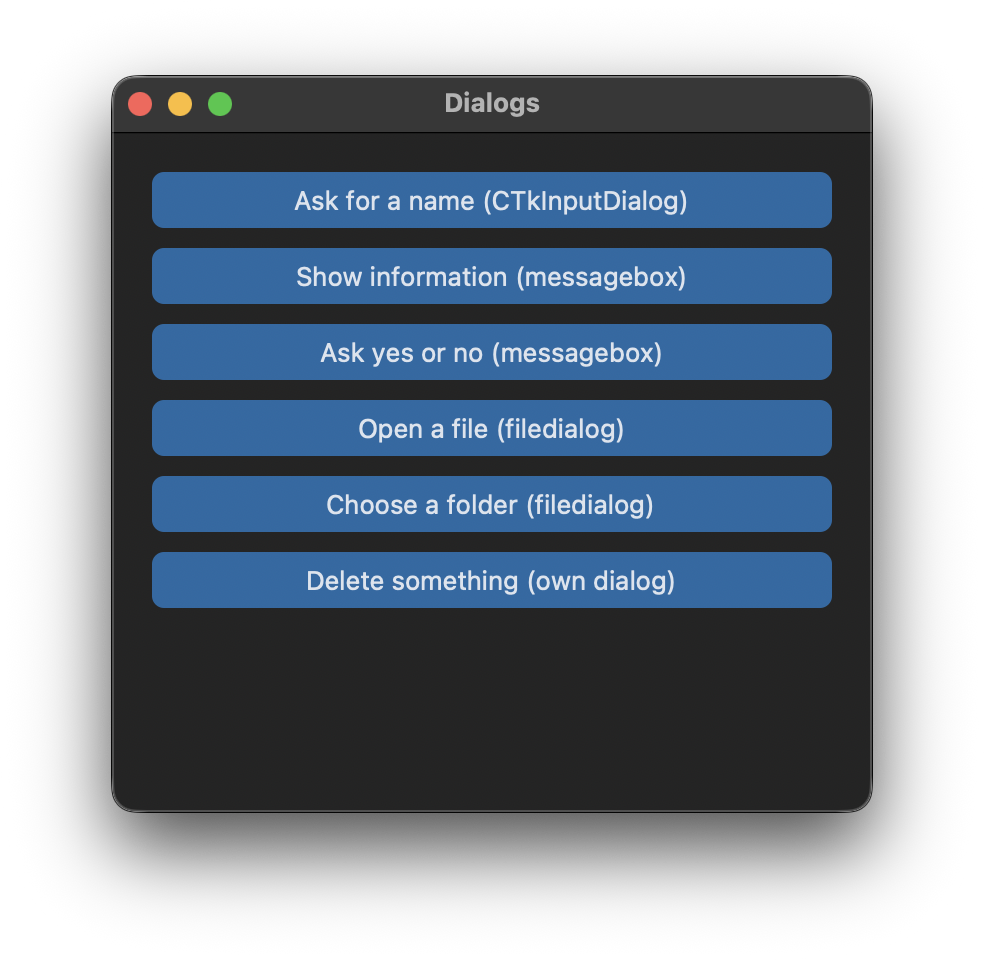
CTkInputDialog
The CTkInputDialog asks the user for a text. get_input() opens the dialog, waits until it is closed and returns the text. If the user clicks Cancel or closes the dialog, it returns None:
    def ask_name(self):
        self.input_dialog = customtkinter.CTkInputDialog(title="Name", text="What is your name?")
        name = self.input_dialog.get_input()  # None if the dialog was cancelled or closed
        if name:
            self.result_label.configure(text=f"Hello, {name}!")
        else:
            self.result_label.configure(text="No name entered.")
Message boxes
For messages and simple questions you can use the messagebox module of tkinter. These dialogs look like the native dialogs of the operating system and not like CustomTkinter, but they work well and the user knows them. The functions wait until the dialog is closed:
from tkinter import messagebox

messagebox.showinfo("Saved", "The file was saved.", parent=self)
messagebox.showwarning("Warning", "The file is very large.", parent=self)
messagebox.showerror("Error", "The file could not be opened.", parent=self)

if messagebox.askyesno("Question", "Do you want to continue?", parent=self):
    print("yes")
askyesno and askokcancel return True or False, askyesnocancel returns None for Cancel. With parent=self the dialog is shown above the window of your app.
File dialogs
To open or save files, use the file dialogs of tkinter. They are also available as customtkinter.filedialog. If the user cancels the dialog, an empty string is returned:
path = customtkinter.filedialog.askopenfilename(parent=self, title="Open a text file",
                                                filetypes=[("Text files", "*.txt"), ("All files", "*.*")])
if path:
    print("open", path)

folder = customtkinter.filedialog.askdirectory(parent=self, title="Choose a folder")
save_path = customtkinter.filedialog.asksaveasfilename(parent=self, defaultextension=".txt")
Your own dialog
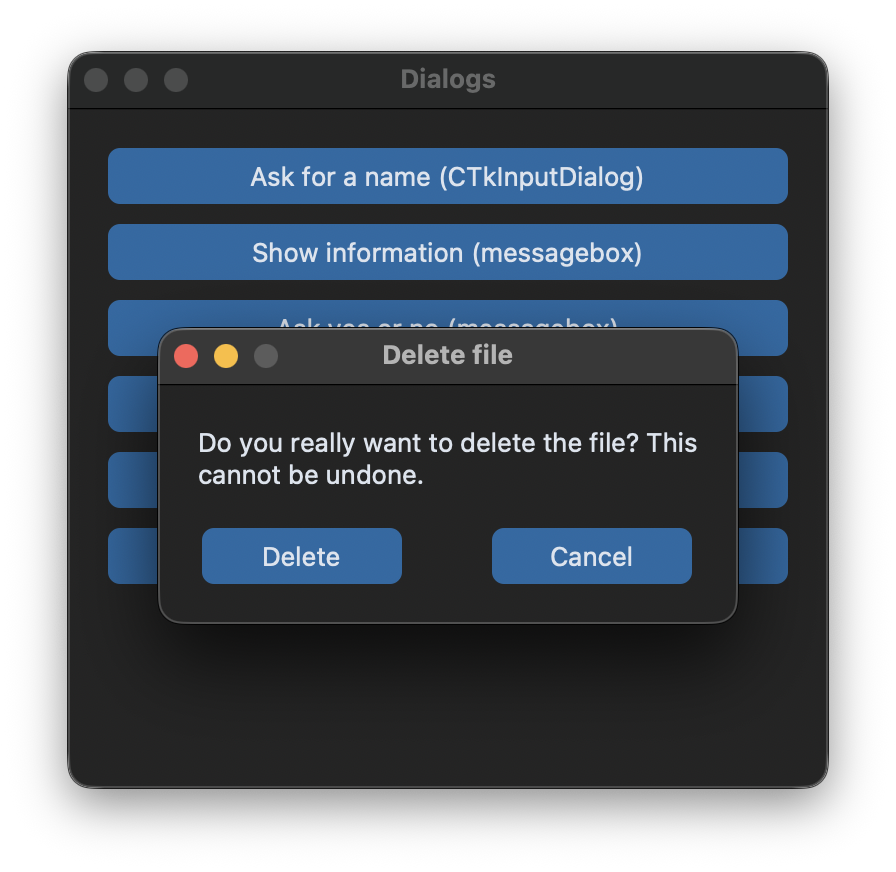
If a dialog should look like the rest of the app or needs more than one or two buttons, you can create it yourself as a CTkToplevel. The following MessageDialog shows a text and any number of buttons, and get() returns the text of the button that was clicked:
class MessageDialog(customtkinter.CTkToplevel):
    """A modal dialog in CustomTkinter style, get() returns the text of the clicked button."""

    def __init__(self, master, title, message, buttons=("OK",)):
        super().__init__(master)
        self.title(title)
        self.resizable(False, False)
        self.transient(master)  # keep the dialog above the main window
        self.result = None
        ...
        self.protocol("WM_DELETE_WINDOW", lambda: self.answer(None))  # closing the window counts as no answer
        self.center_over(master)
        self.after(100, self.make_modal)
Three things make the dialog behave like a dialog:
transient(master)keeps the dialog above the main window. On Windows it also removes the dialog from the taskbar.grab_set()makes the dialog modal, which means that clicks on the other windows of the app are ignored until the dialog is closed. On Linux,grab_set()fails if the window is not visible yet, somake_modaltries again after 100 ms in this case.wait_window()in thegetmethod waits until the dialog is destroyed. The app keeps running in the meantime, so the windows are still redrawn.
    def make_modal(self):
        try:
            self.grab_set()  # clicks on other windows of the app are ignored until the dialog is closed
        except tkinter.TclError:
            self.after(100, self.make_modal)  # the window is not visible yet, try again
            return
        self.focus()

    def answer(self, value):
        self.result = value
        self.grab_release()
        self.destroy()

    def get(self):
        self.master.wait_window(self)  # wait until the dialog is closed
        return self.result
The dialog is then used like the CTkInputDialog:
answer = MessageDialog(self, "Delete file", "Do you really want to delete the file?",
                       buttons=("Delete", "Cancel")).get()
Full code
import os
import tkinter
from tkinter import messagebox
import customtkinter


class MessageDialog(customtkinter.CTkToplevel):
    """A modal dialog in CustomTkinter style, get() returns the text of the clicked button."""

    def __init__(self, master, title, message, buttons=("OK",)):
        super().__init__(master)
        self.title(title)
        self.resizable(False, False)
        self.transient(master)  # keep the dialog above the main window
        self.result = None

        self.grid_columnconfigure(tuple(range(len(buttons))), weight=1)
        self.label = customtkinter.CTkLabel(self, text=message, wraplength=280, justify="left")
        self.label.grid(row=0, column=0, columnspan=len(buttons), padx=20, pady=20, sticky="w")
        for column, text in enumerate(buttons):
            button = customtkinter.CTkButton(self, text=text, width=100, command=lambda t=text: self.answer(t))
            button.grid(row=1, column=column, padx=10, pady=(0, 20))

        self.protocol("WM_DELETE_WINDOW", lambda: self.answer(None))  # closing the window counts as no answer
        self.center_over(master)
        self.after(100, self.make_modal)

    def center_over(self, master):
        self.update_idletasks()
        x = master.winfo_rootx() + (master.winfo_width() - self.winfo_reqwidth()) // 2
        y = master.winfo_rooty() + (master.winfo_height() - self.winfo_reqheight()) // 2
        self.geometry(f"+{x}+{y}")

    def make_modal(self):
        try:
            self.grab_set()  # clicks on other windows of the app are ignored until the dialog is closed
        except tkinter.TclError:
            self.after(100, self.make_modal)  # the window is not visible yet, try again
            return
        self.focus()

    def answer(self, value):
        self.result = value
        self.grab_release()
        self.destroy()

    def get(self):
        self.master.wait_window(self)  # wait until the dialog is closed
        return self.result


class App(customtkinter.CTk):
    def __init__(self):
        super().__init__()

        self.title("Dialogs")
        self.geometry("380x340")
        self.grid_columnconfigure(0, weight=1)

        actions = [
            ("Ask for a name (CTkInputDialog)", self.ask_name),
            ("Show information (messagebox)", self.show_info),
            ("Ask yes or no (messagebox)", self.ask_yes_no),
            ("Open a file (filedialog)", self.open_file),
            ("Choose a folder (filedialog)", self.choose_folder),
            ("Delete something (own dialog)", self.ask_delete),
        ]
        for row, (text, command) in enumerate(actions):
            button = customtkinter.CTkButton(self, text=text, command=command)
            button.grid(row=row, column=0, padx=20, pady=(20 if row == 0 else 10, 0), sticky="ew")

        self.result_label = customtkinter.CTkLabel(self, text="", wraplength=340)
        self.result_label.grid(row=len(actions), column=0, padx=20, pady=20)

    def ask_name(self):
        self.input_dialog = customtkinter.CTkInputDialog(title="Name", text="What is your name?")
        name = self.input_dialog.get_input()  # None if the dialog was cancelled or closed
        if name:
            self.result_label.configure(text=f"Hello, {name}!")
        else:
            self.result_label.configure(text="No name entered.")

    def show_info(self):
        messagebox.showinfo("Saved", "The file was saved.", parent=self)

    def ask_yes_no(self):
        if messagebox.askyesno("Question", "Do you want to continue?", parent=self):
            self.result_label.configure(text="You chose yes.")
        else:
            self.result_label.configure(text="You chose no.")

    def open_file(self):
        path = customtkinter.filedialog.askopenfilename(parent=self, title="Open a text file",
                                                        filetypes=[("Text files", "*.txt"), ("All files", "*.*")])
        if path:  # empty if the user cancelled
            self.result_label.configure(text=f"File: {os.path.basename(path)}")

    def choose_folder(self):
        folder = customtkinter.filedialog.askdirectory(parent=self, title="Choose a folder")
        if folder:
            self.result_label.configure(text=f"Folder: {folder}")

    def ask_delete(self):
        self.dialog = MessageDialog(self, "Delete file", "Do you really want to delete the file? "
                                    "This cannot be undone.", buttons=("Delete", "Cancel"))
        answer = self.dialog.get()
        self.result_label.configure(text=f"Answer: {answer}")


app = App()
app.mainloop()
There is also a community widget CTkMessagebox, which is not part of CustomTkinter, if you need message boxes with icons in CustomTkinter style.
Common errors
_tkinter.TclError: grab failed: window not viewable
grab_set() was called before the window was visible, which happens on Linux. Call it with a delay and try again like in make_modal above.
The dialog opens behind the main window
Call transient(master) for the dialog, and lift() if it is still hidden. Message boxes and file dialogs should always get the parent argument.