4. Events and Key Bindings
bind
Buttons, sliders and the other widgets call their command when they are used. For everything else, like a key in an entry, a click on a frame or the mouse moving over a widget, there is bind(). It connects an event to a function, which gets an event object with details about what happened:
self.entry.bind("<Return>", self.entry_submitted)
self.entry.bind("<Escape>", self.clear_entry)

def entry_submitted(self, event):
    text = self.entry.get().strip()
The most common events are:
| event | when |
|---|---|
<Return>, <Escape>, <Tab>, <Up>, <a> | a key is pressed |
<Key> | any key is pressed, event.keysym is its name |
<Button-1> | click with the left mouse button |
<Double-Button-1> | double click |
<Button-3> | right click on Windows and Linux, <Button-2> on macOS with Tk 8.6 |
<Enter>, <Leave> | the mouse moves onto or away from the widget |
<FocusIn>, <FocusOut> | the widget gets or loses the keyboard focus |
CustomTkinter widgets use bindings themselves, for example for the hover effect of a button. That's why bind() always adds the new function to the existing ones, add=False raises a ValueError.
Clickable frames
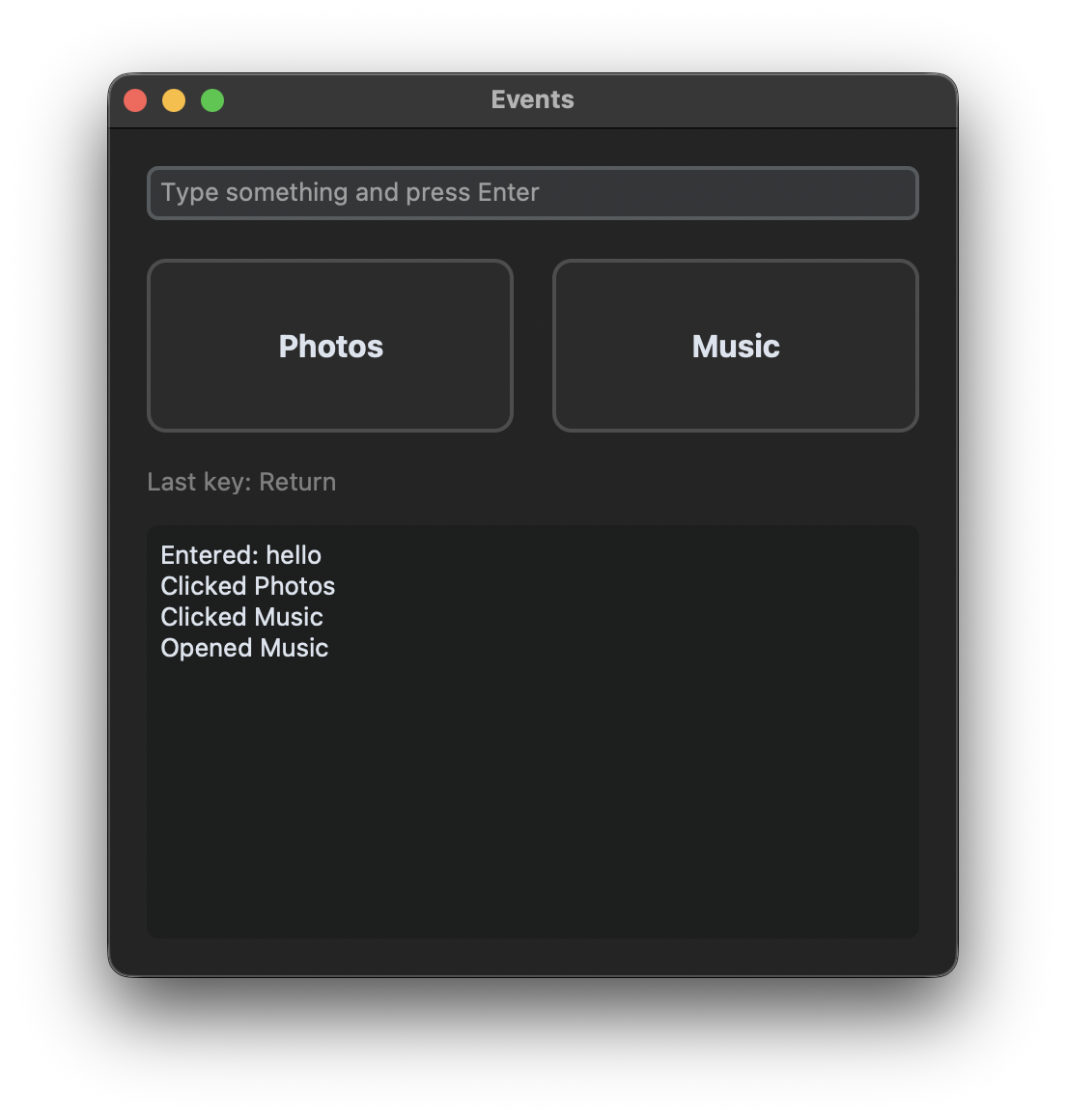
A CTkFrame doesn't have a command, but with <Button-1> and the hover events it can work like a big button. The label in the middle of the frame covers a part of it, and a click on the label doesn't reach the frame. So the label gets the same bindings:
for widget in (card, label):
    widget.bind("<Enter>", lambda event, card=card: card.configure(border_color=self.hover_border))
    widget.bind("<Leave>", lambda event, card=card: card.configure(border_color=self.normal_border))
    widget.bind("<Button-1>", lambda event, name=name: self.log(f"Clicked {name}"))
    widget.bind("<Double-Button-1>", lambda event, name=name: self.log(f"Opened {name}"))
The functions get the event as first argument, so the lambdas have the parameter event, even if they don't use it. card=card and name=name store the values for each frame, otherwise all lambdas would use the values of the last frame of the loop.
A double click also triggers <Button-1> with the first click. That's why the list shows "Clicked Music" before "Opened Music". If both should do something completely different, it's better to use only one of them.
Shortcuts for the whole window
A binding on the window works in all widgets of the window, no matter which one has the keyboard focus. Shortcuts use the Command key on macOS and the Control key on Windows and Linux, so the modifier is chosen once at the beginning of the program:
MODIFIER = "Command" if sys.platform == "darwin" else "Control"

self.bind("<Key>", self.key_pressed)
self.bind(f"<{MODIFIER}-l>", self.clear_log)
self.bind(f"<{MODIFIER}-L>", self.clear_log)  # with Caps Lock or Shift
<Control-l> only matches the lowercase letter. With Caps Lock or Shift the key is an uppercase L, so the shortcut is bound twice. <Key> is not called for Control+L, because tkinter uses the more specific binding.
Keyboard focus
Key events go to the widget with the keyboard focus. To start typing right away, the entry gets the focus when the window is shown:
self.after(100, self.entry.focus)
Called directly in __init__, the focus can get lost on some systems while the window opens, so we wait a moment with after(). Since CustomTkinter 6.0 an entry or textbox loses the focus when you click somewhere else in the window.
Full code
import sys
import customtkinter

# shortcuts use the Command key on macOS and the Control key on Windows and Linux
MODIFIER = "Command" if sys.platform == "darwin" else "Control"
MODIFIER_NAME = "Cmd" if sys.platform == "darwin" else "Ctrl"


class App(customtkinter.CTk):
    def __init__(self):
        super().__init__()

        self.title("Events")
        self.geometry("440x440")
        self.grid_columnconfigure((0, 1), weight=1)
        self.grid_rowconfigure(3, weight=1)

        # keys in an entry
        self.entry = customtkinter.CTkEntry(self, placeholder_text="Type something and press Enter")
        self.entry.grid(row=0, column=0, columnspan=2, padx=20, pady=(20, 10), sticky="ew")
        self.entry.bind("<Return>", self.entry_submitted)
        self.entry.bind("<Escape>", self.clear_entry)

        # frames that react to the mouse like buttons
        self.normal_border = ("gray75", "gray30")
        self.hover_border = customtkinter.ThemeManager.theme["CTkButton"]["fg_color"]
        for column, name in enumerate(["Photos", "Music"]):
            card = customtkinter.CTkFrame(self, height=90, corner_radius=10, border_width=2,
                                          border_color=self.normal_border)
            card.grid(row=1, column=column, padx=(20, 10) if column == 0 else (10, 20), pady=10, sticky="ew")
            label = customtkinter.CTkLabel(card, text=name, font=customtkinter.CTkFont(size=16, weight="bold"))
            label.place(relx=0.5, rely=0.5, anchor="center")
            # the label covers a part of the frame, so it gets the same bindings
            for widget in (card, label):
                widget.bind("<Enter>", lambda event, card=card: card.configure(border_color=self.hover_border))
                widget.bind("<Leave>", lambda event, card=card: card.configure(border_color=self.normal_border))
                widget.bind("<Button-1>", lambda event, name=name: self.log(f"Clicked {name}"))
                widget.bind("<Double-Button-1>", lambda event, name=name: self.log(f"Opened {name}"))

        self.key_label = customtkinter.CTkLabel(self, text=f"Press a key. {MODIFIER_NAME}+L clears the list.",
                                                text_color="gray50")
        self.key_label.grid(row=2, column=0, columnspan=2, padx=20, pady=0, sticky="w")

        self.log_box = customtkinter.CTkTextbox(self, state="disabled")
        self.log_box.grid(row=3, column=0, columnspan=2, padx=20, pady=(10, 20), sticky="nsew")

        # bindings on the window work in all its widgets
        self.bind("<Key>", self.key_pressed)
        self.bind(f"<{MODIFIER}-l>", self.clear_log)
        self.bind(f"<{MODIFIER}-L>", self.clear_log)  # with Caps Lock or Shift

        # the entry gets the keyboard focus when the window is shown
        self.after(100, self.entry.focus)

    def entry_submitted(self, event):
        text = self.entry.get().strip()
        if text:
            self.log(f"Entered: {text}")
            self.entry.delete(0, "end")

    def clear_entry(self, event):
        self.entry.delete(0, "end")

    def key_pressed(self, event):
        self.key_label.configure(text=f"Last key: {event.keysym}")

    def clear_log(self, event=None):
        self.log_box.configure(state="normal")
        self.log_box.delete("1.0", "end")
        self.log_box.configure(state="disabled")

    def log(self, text):
        self.log_box.configure(state="normal")
        self.log_box.insert("end", text + "\n")
        self.log_box.configure(state="disabled")
        self.log_box.see("end")


app = App()
app.mainloop()
Stop the default behavior
The function of a binding is called before the default behavior of the widget, like inserting the typed character. If the function returns "break", the default behavior is skipped. For example, the Tab key in a textbox inserts four spaces instead of a tab character:
def insert_spaces(event):
    textbox.insert("insert", "    ")
    return "break"

textbox.bind("<Tab>", insert_spaces)
Common errors
TypeError: App.clear_log() takes 1 positional argument but 2 were given
A function that is used with bind() gets the event as argument, also if it is a method that is called by a button as well. Give the parameter a default value, then the function works for both: def clear_log(self, event=None).
The function is called when the program starts
bind("<Return>", self.entry_submitted()) calls the function immediately and binds its return value. Pass the function without parentheses: bind("<Return>", self.entry_submitted).
A shortcut doesn't work
Check if Caps Lock is on, in that case the uppercase letter has to be bound as well. On macOS, use Command instead of Control. A binding on a widget only works while this widget has the keyboard focus, bind shortcuts on the window instead.
The frame doesn't react when the mouse is over the label
Widgets inside a frame get their own events. Bind the same functions on the frame and on all widgets inside, like the label above.