2. Multiple Pages
Pages as frames
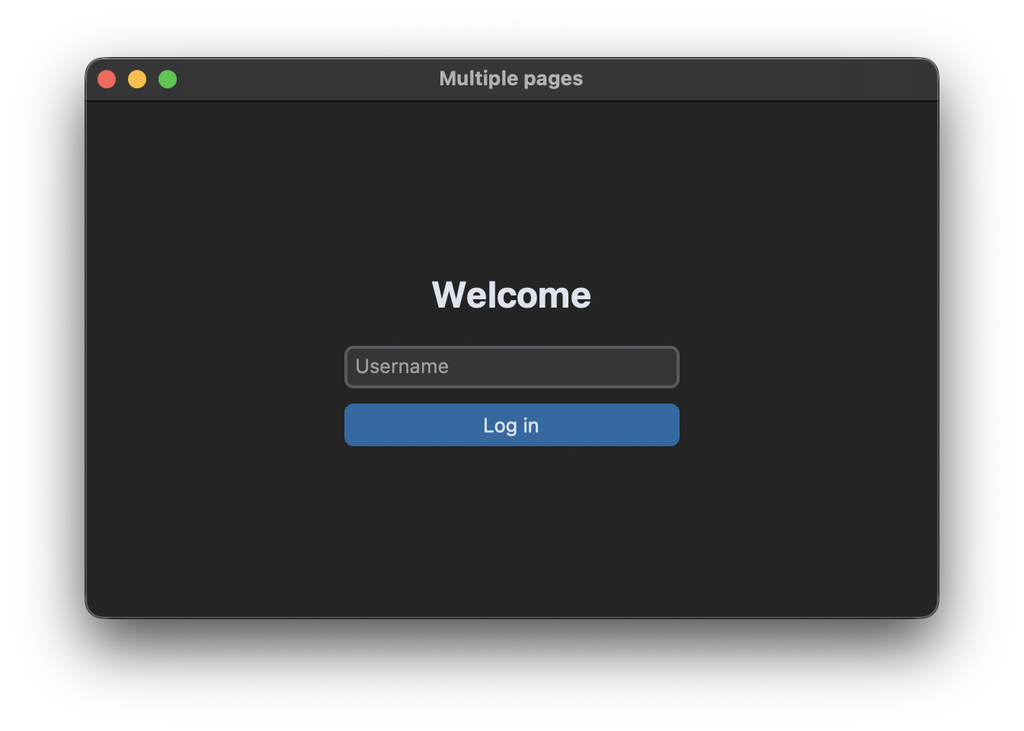
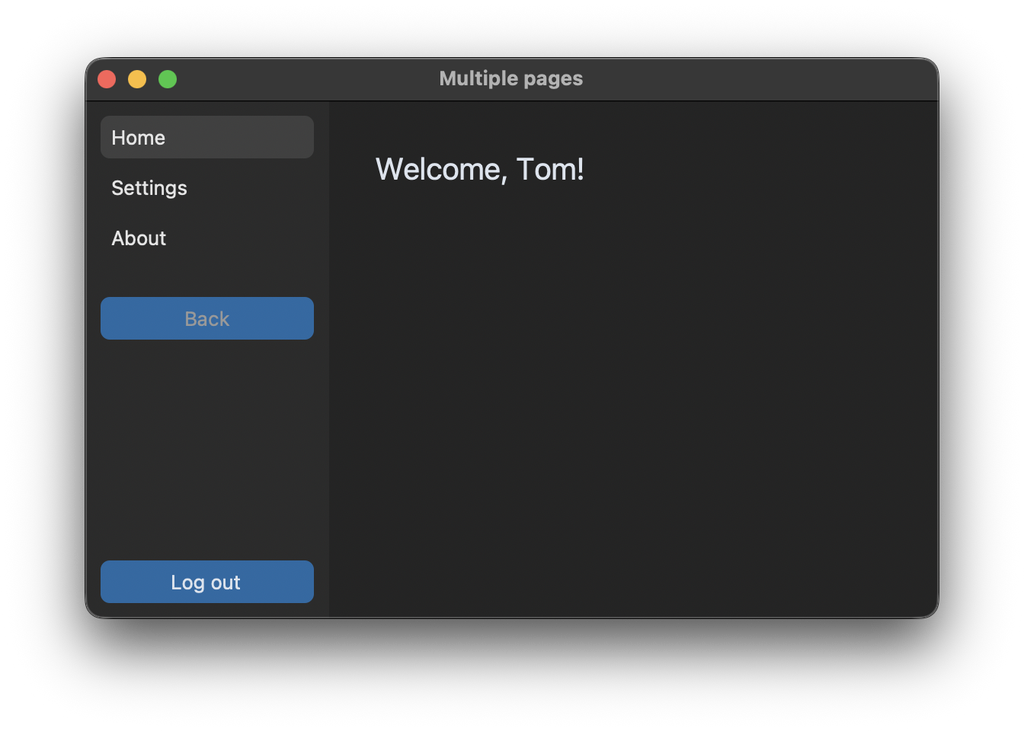
An app with several pages, like a home page, a settings page and an about page, is built from frames. Every page is a class that inherits from CTkFrame, and only one of them is visible at a time. In this tutorial we also add a login page, which is shown before the main part of the app.
All pages get a reference to the App object, so they can read data that belongs to the whole app, like the name of the user. The method on_show is called every time a page becomes visible, so it can update its content:
class HomePage(customtkinter.CTkFrame):
    def __init__(self, master, app):
        super().__init__(master, fg_color="transparent")
        self.app = app
        self.welcome_label = customtkinter.CTkLabel(self, text="", font=customtkinter.CTkFont(size=20))
        self.welcome_label.grid(row=0, column=0, sticky="w")

    def on_show(self):
        self.welcome_label.configure(text=f"Welcome, {self.app.username}!")
Show one page at a time
The MainView frame contains the sidebar and the area for the pages. All pages are created once and placed in the same grid cell, then they are hidden again with grid_remove():
self.pages = {
    "home": HomePage(self, app),
    "settings": SettingsPage(self, app),
    "about": AboutPage(self, app),
}
for page in self.pages.values():
    page.grid(row=0, column=1, padx=30, pady=30, sticky="nsew")
    page.grid_remove()
grid_remove() hides a widget, but remembers its grid options. So grid() without arguments shows the page again at the same place. This is the difference to grid_forget(), which also forgets the options. To show a page, we hide the current one and show the new one:
    def show_page(self, name, remember=True):
        if name == self.current:
            return
        if self.current is not None:
            self.pages[self.current].grid_remove()
            if remember:
                self.history.append(self.current)

        self.current = name
        self.pages[name].grid()  # grid() without arguments restores the options from before grid_remove()
        self.pages[name].on_show()
Because the pages are only created once, they keep their state when they are hidden, for example the text in an entry.
Navigation sidebar
The sidebar has a button for every page. With lambda n=name: every button calls show_page with the name of its own page. The buttons have a transparent fg_color, and the button of the visible page gets a background color in show_page:
for button_name, button in self.nav_buttons.items():
    button.configure(fg_color=("gray75", "gray25") if button_name == name else "transparent")
Back button
For a back button, show_page saves the name of the previous page in the list self.history. go_back takes the last page from the list and shows it, without adding it to the history again:
    def go_back(self):
        if self.history:
            self.show_page(self.history.pop(), remember=False)
Login page
The login page and the MainView are both placed in the window, but only one of them at a time. After a successful login, the window hides the login page with grid_forget() and shows the MainView. On logout it's the other way around:
    def login(self, username):
        self.username = username
        self.login_page.grid_forget()
        self.main_view.grid(row=0, column=0, sticky="nsew")
        self.main_view.show_page("home")

    def logout(self):
        self.main_view.grid_forget()
        self.main_view.reset()
        self.login_page.grid(row=0, column=0, sticky="nsew")
Full code
import customtkinter


class LoginPage(customtkinter.CTkFrame):
    def __init__(self, master, on_login):
        super().__init__(master, fg_color="transparent")
        self.on_login = on_login
        self.grid_columnconfigure(0, weight=1)
        self.grid_rowconfigure((0, 4), weight=1)  # empty rows above and below center the content

        self.title_label = customtkinter.CTkLabel(self, text="Welcome", font=customtkinter.CTkFont(size=24, weight="bold"))
        self.title_label.grid(row=1, column=0, pady=(0, 20))
        self.username_entry = customtkinter.CTkEntry(self, placeholder_text="Username", width=220)
        self.username_entry.grid(row=2, column=0, pady=(0, 10))
        self.username_entry.bind("<Return>", self.login)
        self.login_button = customtkinter.CTkButton(self, text="Log in", width=220, command=self.login)
        self.login_button.grid(row=3, column=0)

    def login(self, event=None):
        username = self.username_entry.get().strip()
        if username:
            self.username_entry.delete(0, "end")
            self.on_login(username)


class HomePage(customtkinter.CTkFrame):
    def __init__(self, master, app):
        super().__init__(master, fg_color="transparent")
        self.app = app
        self.welcome_label = customtkinter.CTkLabel(self, text="", font=customtkinter.CTkFont(size=20))
        self.welcome_label.grid(row=0, column=0, sticky="w")

    def on_show(self):
        self.welcome_label.configure(text=f"Welcome, {self.app.username}!")


class SettingsPage(customtkinter.CTkFrame):
    def __init__(self, master, app):
        super().__init__(master, fg_color="transparent")
        self.app = app
        self.title_label = customtkinter.CTkLabel(self, text="Settings", font=customtkinter.CTkFont(size=20))
        self.title_label.grid(row=0, column=0, pady=(0, 20), sticky="w")
        self.name_entry = customtkinter.CTkEntry(self, width=220)
        self.name_entry.grid(row=1, column=0, pady=(0, 10), sticky="w")
        self.save_button = customtkinter.CTkButton(self, text="Save name", command=self.save)
        self.save_button.grid(row=2, column=0, sticky="w")
        self.status_label = customtkinter.CTkLabel(self, text="")
        self.status_label.grid(row=3, column=0, sticky="w")

    def on_show(self):
        self.name_entry.set(self.app.username)
        self.status_label.configure(text="")

    def save(self):
        name = self.name_entry.get().strip()
        if name:
            self.app.username = name
            self.status_label.configure(text="Saved.")


class AboutPage(customtkinter.CTkFrame):
    def __init__(self, master, app):
        super().__init__(master, fg_color="transparent")
        self.label = customtkinter.CTkLabel(self, text="This app shows how to switch between pages.")
        self.label.grid(row=0, column=0, sticky="w")

    def on_show(self):
        pass


class MainView(customtkinter.CTkFrame):
    """A sidebar with navigation buttons and the area where one page at a time is shown."""

    def __init__(self, master, app):
        super().__init__(master, fg_color="transparent")
        self.app = app
        self.grid_columnconfigure(1, weight=1)
        self.grid_rowconfigure(0, weight=1)

        self.sidebar = customtkinter.CTkFrame(self, corner_radius=0)
        self.sidebar.grid(row=0, column=0, sticky="ns")
        self.sidebar.grid_rowconfigure(4, weight=1)

        # all pages are created once and placed in the same grid cell, only one of them is visible
        self.pages = {
            "home": HomePage(self, app),
            "settings": SettingsPage(self, app),
            "about": AboutPage(self, app),
        }
        for page in self.pages.values():
            page.grid(row=0, column=1, padx=30, pady=30, sticky="nsew")
            page.grid_remove()

        self.nav_buttons = {}
        for row, (name, text) in enumerate([("home", "Home"), ("settings", "Settings"), ("about", "About")]):
            button = customtkinter.CTkButton(self.sidebar, text=text, anchor="w", fg_color="transparent",
                                             text_color=("gray10", "gray90"), hover_color=("gray70", "gray30"),
                                             command=lambda n=name: self.show_page(n))
            button.grid(row=row, column=0, padx=10, pady=(10 if row == 0 else 0, 5), sticky="ew")
            self.nav_buttons[name] = button

        self.back_button = customtkinter.CTkButton(self.sidebar, text="Back", command=self.go_back)
        self.back_button.grid(row=3, column=0, padx=10, pady=(20, 0), sticky="ew")
        self.logout_button = customtkinter.CTkButton(self.sidebar, text="Log out", command=app.logout)
        self.logout_button.grid(row=5, column=0, padx=10, pady=10, sticky="ew")

        self.current = None
        self.history = []

    def show_page(self, name, remember=True):
        if name == self.current:
            return
        if self.current is not None:
            self.pages[self.current].grid_remove()
            if remember:
                self.history.append(self.current)

        self.current = name
        self.pages[name].grid()  # grid() without arguments restores the options from before grid_remove()
        self.pages[name].on_show()

        for button_name, button in self.nav_buttons.items():
            button.configure(fg_color=("gray75", "gray25") if button_name == name else "transparent")
        self.back_button.configure(state="normal" if self.history else "disabled")

    def go_back(self):
        if self.history:
            self.show_page(self.history.pop(), remember=False)

    def reset(self):
        if self.current is not None:
            self.pages[self.current].grid_remove()
        self.current = None
        self.history = []


class App(customtkinter.CTk):
    def __init__(self):
        super().__init__()

        self.title("Multiple pages")
        self.geometry("560x340")
        self.grid_columnconfigure(0, weight=1)
        self.grid_rowconfigure(0, weight=1)

        self.username = ""  # data that all pages can read through self.app

        self.login_page = LoginPage(self, on_login=self.login)
        self.main_view = MainView(self, app=self)
        self.login_page.grid(row=0, column=0, sticky="nsew")

    def login(self, username):
        self.username = username
        self.login_page.grid_forget()
        self.main_view.grid(row=0, column=0, sticky="nsew")
        self.main_view.show_page("home")

    def logout(self):
        self.main_view.grid_forget()
        self.main_view.reset()
        self.login_page.grid(row=0, column=0, sticky="nsew")


app = App()
app.mainloop()
If you change the name on the settings page and go back to the home page, the welcome text shows the new name, because on_show reads it from the app again.
Common errors
All pages are visible at the same time
The pages are placed in the same grid cell, but not hidden. Call grid_remove() for every page after placing it, and for the current page before showing another one.
A page shows old data
The __init__ method of a page only runs once. Update the content in a method like on_show, which is called every time the page is shown.