1. Structure an App with Classes
One class for every part
In the Using Frames tutorial we already created frames as classes. In a bigger app the question is how these classes work together: how does a click in one frame change something in another frame, and where is the data stored?
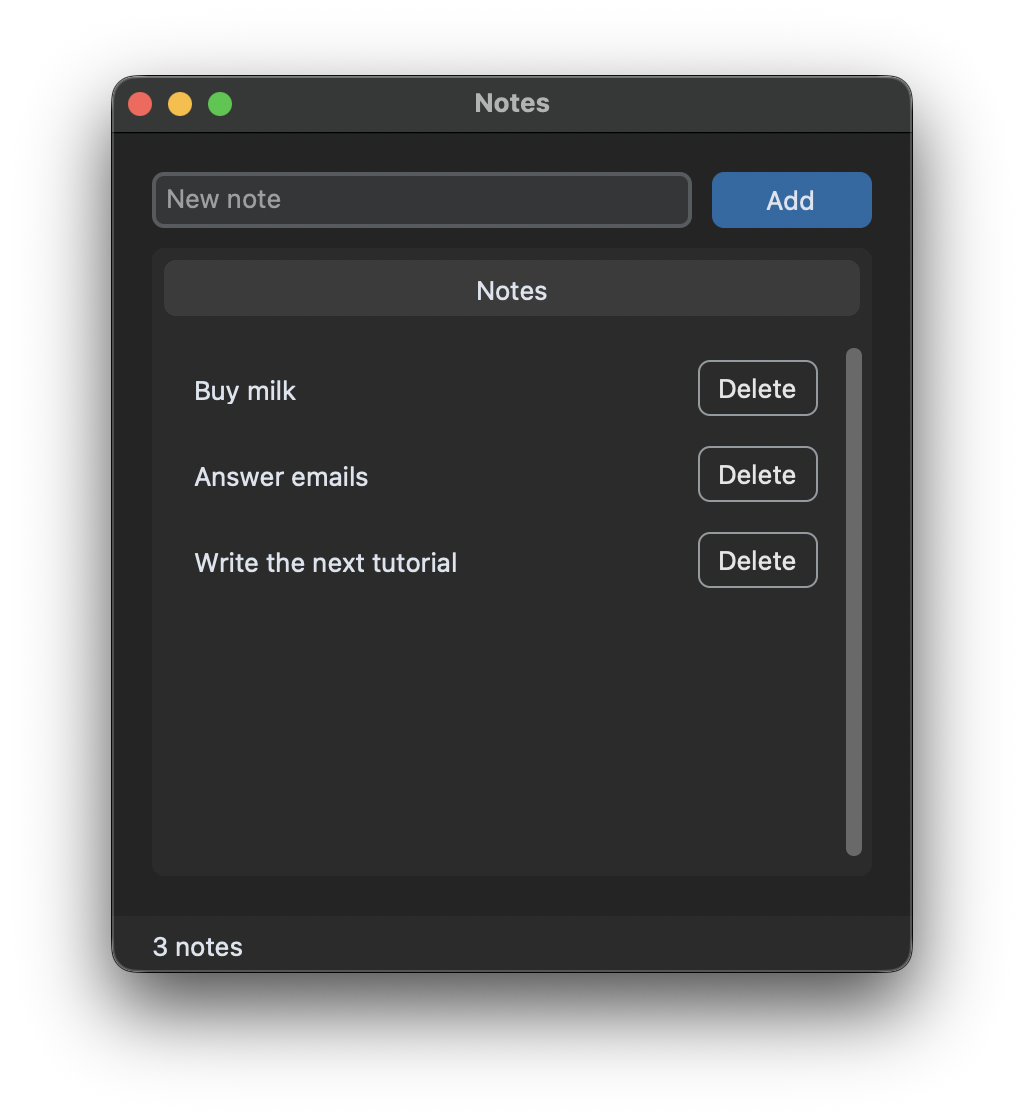
In this tutorial we build a small notes app with three parts, and each of them is its own class:
InputFrame: an entry and a button to add a noteNoteListFrame: a scrollable list of the notes, with a delete button for every noteStatusBar: a label at the bottom that shows the number of notes
The main window App creates these three frames and connects them.
The window owns the data
The list of notes is stored in one place, the App class. The frames don't store it and they don't change it themselves. This makes it easy to see where the data changes, and later you could save the list to a file or load it from a database in this one place:
class App(customtkinter.CTk):
    def __init__(self):
        super().__init__()
        ...
        self.notes = []

    def add_note(self, text):
        self.notes.append(text)
        self.update_view()

    def delete_note(self, index):
        del self.notes[index]
        self.update_view()

    def update_view(self):
        self.note_list.show(self.notes)
        count = len(self.notes)
        self.status_bar.set(f"{count} note" if count == 1 else f"{count} notes")
Callbacks from the frames to the window
The InputFrame needs to tell the window that a note should be added. Instead of accessing the window with self.master and knowing its methods, the frame gets a function as argument, which it calls with the new text. Such a function is called a callback:
class InputFrame(customtkinter.CTkFrame):
    def __init__(self, master, on_add):
        super().__init__(master, fg_color="transparent")
        self.on_add = on_add
        ...

    def add(self):
        text = self.entry.get().strip()
        if text:
            self.on_add(text)
            self.entry.delete(0, "end")
The window passes its own method add_note as the callback:
self.input_frame = InputFrame(self, on_add=self.add_note)
The InputFrame doesn't know anything about the list or the other frames. You could use it in another app without changes, for example to add contacts instead of notes.
Methods from the window to the frames
The other direction is simpler: the window has references to all frames and calls their methods. NoteListFrame.show gets the list of notes and creates a row for each of them. The delete buttons call the callback on_delete with the index of their note. The index is passed with lambda i=index:, because a lambda without the default argument would use the last value of index for all buttons:
button = customtkinter.CTkButton(row, text="Delete", width=60, fg_color="transparent", border_width=1,
                                 text_color=("gray10", "gray90"),
                                 command=lambda i=index: self.on_delete(i))
Full code
import customtkinter


class InputFrame(customtkinter.CTkFrame):
    """Entry and button for a new note. It does not know where notes are stored, it only calls on_add."""

    def __init__(self, master, on_add):
        super().__init__(master, fg_color="transparent")
        self.on_add = on_add
        self.grid_columnconfigure(0, weight=1)

        self.entry = customtkinter.CTkEntry(self, placeholder_text="New note")
        self.entry.grid(row=0, column=0, padx=(0, 10), sticky="ew")
        self.entry.bind("<Return>", lambda event: self.add())
        self.button = customtkinter.CTkButton(self, text="Add", width=80, command=self.add)
        self.button.grid(row=0, column=1)

    def add(self):
        text = self.entry.get().strip()
        if text:
            self.on_add(text)
            self.entry.delete(0, "end")


class NoteListFrame(customtkinter.CTkScrollableFrame):
    """Shows the notes it gets from show(). A click on Delete calls on_delete with the index of the note."""

    def __init__(self, master, on_delete):
        super().__init__(master, label_text="Notes")
        self.on_delete = on_delete
        self.grid_columnconfigure(0, weight=1)
        self.rows = []
        self.delete_buttons = []

    def show(self, notes):
        for row in self.rows:
            row.destroy()
        self.rows = []
        self.delete_buttons = []

        for index, note in enumerate(notes):
            row = customtkinter.CTkFrame(self)
            row.grid(row=index, column=0, padx=5, pady=(5, 0), sticky="ew")
            row.grid_columnconfigure(0, weight=1)
            label = customtkinter.CTkLabel(row, text=note, anchor="w")
            label.grid(row=0, column=0, padx=10, pady=5, sticky="ew")
            button = customtkinter.CTkButton(row, text="Delete", width=60, fg_color="transparent", border_width=1,
                                             text_color=("gray10", "gray90"),
                                             command=lambda i=index: self.on_delete(i))
            button.grid(row=0, column=1, padx=5, pady=5)
            self.rows.append(row)
            self.delete_buttons.append(button)


class StatusBar(customtkinter.CTkFrame):
    def __init__(self, master):
        super().__init__(master, corner_radius=0)
        self.grid_columnconfigure(0, weight=1)
        self.label = customtkinter.CTkLabel(self, text="", anchor="w")
        self.label.grid(row=0, column=0, padx=20, sticky="ew")

    def set(self, text):
        self.label.configure(text=text)


class App(customtkinter.CTk):
    """The main window owns the data (the list of notes) and connects the frames."""

    def __init__(self):
        super().__init__()

        self.title("Notes")
        self.geometry("400x420")
        self.grid_columnconfigure(0, weight=1)
        self.grid_rowconfigure(1, weight=1)

        self.notes = []

        self.input_frame = InputFrame(self, on_add=self.add_note)
        self.input_frame.grid(row=0, column=0, padx=20, pady=(20, 10), sticky="ew")
        self.note_list = NoteListFrame(self, on_delete=self.delete_note)
        self.note_list.grid(row=1, column=0, padx=20, pady=0, sticky="nsew")
        self.status_bar = StatusBar(self)
        self.status_bar.grid(row=2, column=0, pady=(20, 0), sticky="ew")

        self.update_view()

    def add_note(self, text):
        self.notes.append(text)
        self.update_view()

    def delete_note(self, index):
        del self.notes[index]
        self.update_view()

    def update_view(self):
        self.note_list.show(self.notes)
        count = len(self.notes)
        self.status_bar.set(f"{count} note" if count == 1 else f"{count} notes")


app = App()
app.mainloop()
Split into several files
When the app grows, you can move every class into its own file. Because the frames only get callbacks and don't import the App class, there are no circular imports:
notes/
├── main.py
├── input_frame.py
├── note_list_frame.py
└── status_bar.py
# main.py
import customtkinter
from input_frame import InputFrame
from note_list_frame import NoteListFrame
from status_bar import StatusBar


class App(customtkinter.CTk):
    ...
Every file that creates widgets needs its own import customtkinter.
Common errors
AttributeError: 'MyFrame' object has no attribute 'tk'
The __init__ method of the class doesn't call super().__init__(master). Without this call, the frame is not created and widgets can't be placed in it.
AttributeError: 'App' object has no attribute 'label'
A method uses self.label before it was created in __init__, or the name is misspelled. Create all widgets before you call methods that use them, like self.update_view() at the end of __init__ in the example above.
Accessing other frames with self.master.master
This works, but breaks as soon as you change the layout, for example by putting a frame into another frame. Pass a callback or a reference to the object you need instead.