3. Extra Windows with CTkToplevel
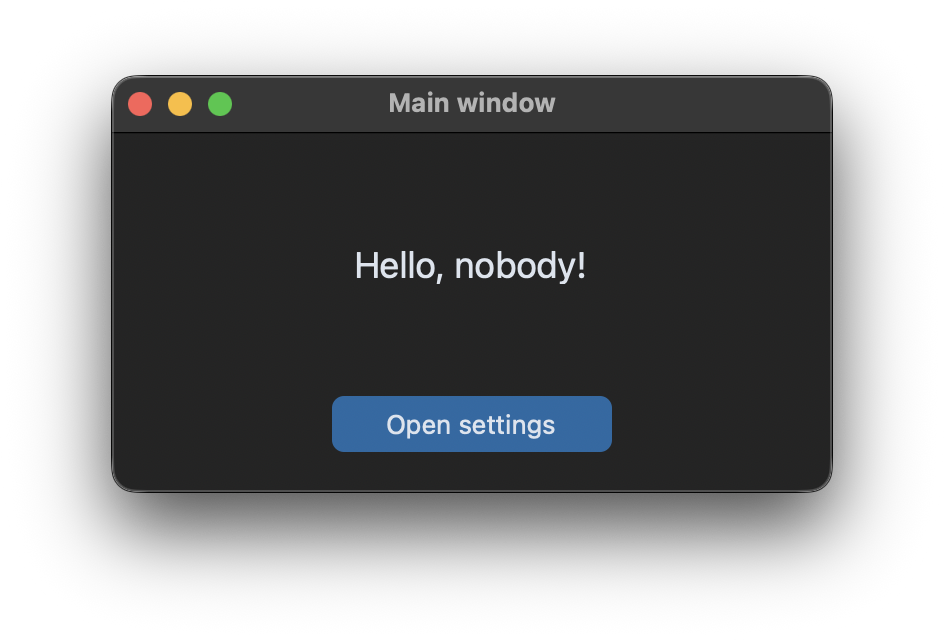
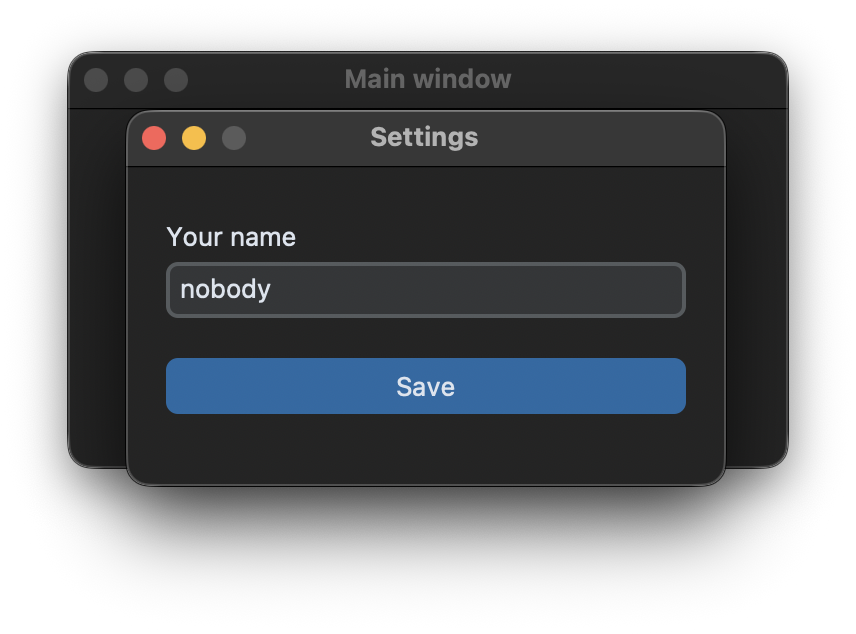
A second window
An app has exactly one CTk window. Every other window, like a settings window, is a CTkToplevel. Like the main window, it is best written as a class:
class SettingsWindow(customtkinter.CTkToplevel):
    def __init__(self, master, name, on_save):
        super().__init__(master)
        self.on_save = on_save

        self.title("Settings")
        self.geometry("300x160")
        self.resizable(False, False)
        self.transient(master)  # keep the window in front of the main window
The CTkToplevel doesn't need its own mainloop(), the mainloop() of the main window handles all windows. If the main window is closed, all CTkToplevel windows are closed too.
Only one window at a time
If the window is created every time a button is clicked, the user can open the settings window many times. Therefore the main window keeps a reference to it and only creates a new window if there is none, or if the old one was closed. winfo_exists() returns False after a window was destroyed:
    def open_settings(self):
        if self.settings_window is None or not self.settings_window.winfo_exists():
            self.settings_window = SettingsWindow(self, self.name, on_save=self.save_name)
        else:
            self.settings_window.bring_to_front()  # the window is already open
Bring the window to the front
On Windows a new CTkToplevel sometimes opens behind the main window. transient(master) keeps it above the main window, and a lift() with a short delay brings it to the front after the window was created. The entry also gets the keyboard focus, so the user can start typing:
        self.after(100, self.bring_to_front)

    def bring_to_front(self):
        self.lift()
        self.name_entry.focus()
Pass data back
When the user clicks Save, the settings window has to give the new name to the main window. Like in the classes tutorial, the window gets a callback for this, so it doesn't have to know the main window:
    def save(self):
        self.on_save(self.name_entry.get().strip())  # give the data back to the main window
        self.destroy()
Full code
import customtkinter


class SettingsWindow(customtkinter.CTkToplevel):
    def __init__(self, master, name, on_save):
        super().__init__(master)
        self.on_save = on_save

        self.title("Settings")
        self.geometry("300x160")
        self.resizable(False, False)
        self.transient(master)  # keep the window in front of the main window
        self.grid_columnconfigure(0, weight=1)

        self.name_label = customtkinter.CTkLabel(self, text="Your name")
        self.name_label.grid(row=0, column=0, padx=20, pady=(20, 0), sticky="w")
        self.name_entry = customtkinter.CTkEntry(self)
        self.name_entry.grid(row=1, column=0, padx=20, pady=(0, 20), sticky="ew")
        self.name_entry.set(name)
        self.name_entry.bind("<Return>", lambda event: self.save())

        self.save_button = customtkinter.CTkButton(self, text="Save", command=self.save)
        self.save_button.grid(row=2, column=0, padx=20, pady=(0, 20), sticky="ew")

        self.after(100, self.bring_to_front)

    def bring_to_front(self):
        self.lift()
        self.name_entry.focus()

    def save(self):
        self.on_save(self.name_entry.get().strip())  # give the data back to the main window
        self.destroy()


class App(customtkinter.CTk):
    def __init__(self):
        super().__init__()

        self.title("Main window")
        self.geometry("360x180")
        self.grid_columnconfigure(0, weight=1)
        self.grid_rowconfigure(0, weight=1)

        self.name = "nobody"
        self.settings_window = None

        self.label = customtkinter.CTkLabel(self, text="", font=customtkinter.CTkFont(size=18))
        self.label.grid(row=0, column=0, padx=20, pady=20)
        self.button = customtkinter.CTkButton(self, text="Open settings", command=self.open_settings)
        self.button.grid(row=1, column=0, padx=20, pady=(0, 20))

        self.show_name()

    def open_settings(self):
        if self.settings_window is None or not self.settings_window.winfo_exists():
            self.settings_window = SettingsWindow(self, self.name, on_save=self.save_name)
        else:
            self.settings_window.bring_to_front()  # the window is already open

    def save_name(self, name):
        if name:
            self.name = name
            self.show_name()

    def show_name(self):
        self.label.configure(text=f"Hello, {self.name}!")


app = App()
app.mainloop()
Modal windows
A modal window blocks the other windows of the app until it is closed. This is done with grab_set(), and wait_window() waits until the window is closed. An example of a modal dialog is in the tutorial Dialogs and Message Boxes.
Common errors
_tkinter.TclError: image "pyimage1" doesn't exist
The second window was created with customtkinter.CTk() or tkinter.Tk() instead of CTkToplevel. Every CTk window has its own Tcl interpreter, and images and variables of one interpreter can't be used in another one. Use CTkToplevel for all windows except the main window.
The window opens behind the main window
Use transient(master) and call lift() with a short delay like in bring_to_front above.
The window opens again and again
Keep a reference to the window and check with winfo_exists() whether it is still open, like in open_settings above.
The icon of the CTkToplevel is replaced
On Windows, CustomTkinter sets its own icon on new CTkToplevel windows. Since version 6.0, an icon that you set with iconbitmap is kept. In older versions, set it with a delay: self.after(250, lambda: self.iconbitmap("icon.ico")).