1. Your First App
Installation
CustomTkinter is installed with pip:
pip install customtkinter
If you have more than one Python version on your computer, pip can belong to a different Python than the one you use to run your program. To be sure, call pip through Python:
python -m pip install customtkinter
On macOS and Linux the command is usually python3 instead of python. You can check the installation and the installed version with:
python -c "import customtkinter; print(customtkinter.__version__)"
A window
Every CustomTkinter app starts with a CTk window and ends with mainloop(). The mainloop() call shows the window and keeps the program running until the window is closed:
import customtkinter

app = customtkinter.CTk()
app.title("Greeting")
app.geometry("360x180")
app.mainloop()
Entry, button and label
Now we add three widgets: an entry for a name, a button and a label for the answer. The first argument of every widget is its master, which is the window app here. The command argument of the button is the function that gets called when the button is clicked:
import customtkinter

def greet():
    name = entry.get()
    label.configure(text=f"Hello, {name}!")

app = customtkinter.CTk()
app.title("Greeting")
app.geometry("360x180")
app.grid_columnconfigure(0, weight=1)

entry = customtkinter.CTkEntry(app, placeholder_text="Your name")
entry.grid(row=0, column=0, padx=20, pady=(20, 10), sticky="ew")
button = customtkinter.CTkButton(app, text="Say hello", command=greet)
button.grid(row=1, column=0, padx=20, pady=10, sticky="ew")
label = customtkinter.CTkLabel(app, text="")
label.grid(row=2, column=0, padx=20, pady=(10, 20))

app.mainloop()
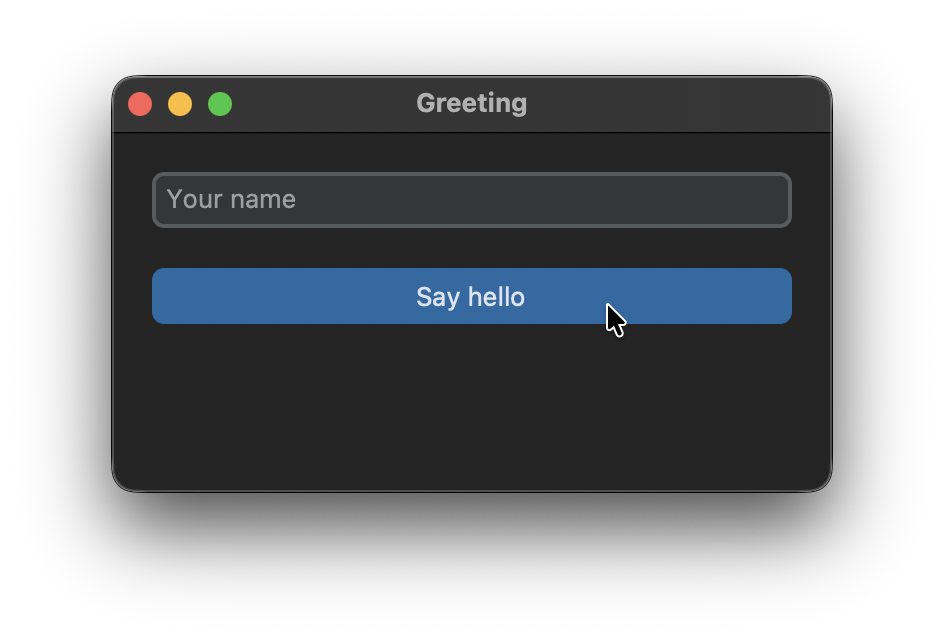
entry.get() returns the text of the entry and label.configure(text=...) changes the text of the label. Every widget has a configure method to change its arguments after it was created, and a cget method to read them. The grid calls place the widgets in the window, how this works is explained in the next tutorial about the grid system.
Note that the button gets command=greet and not command=greet(). With brackets, Python calls the function once while the button is created and passes its return value None as the command.
The app as a class
For a small test this is fine, but as soon as an app gets bigger, it is much easier to read and to extend if it is written as a class. The window becomes a class that inherits from CTk, the widgets become attributes of it and the function becomes a method:
import customtkinter

customtkinter.set_appearance_mode("system")  # "light", "dark" or "system"
customtkinter.set_default_color_theme("blue")  # "blue", "dark-blue", "green" or "gold"


class App(customtkinter.CTk):
    def __init__(self):
        super().__init__()

        self.title("Greeting")
        self.geometry("360x180")
        self.grid_columnconfigure(0, weight=1)

        self.entry = customtkinter.CTkEntry(self, placeholder_text="Your name")
        self.entry.grid(row=0, column=0, padx=20, pady=(20, 10), sticky="ew")
        self.entry.bind("<Return>", self.greet)

        self.button = customtkinter.CTkButton(self, text="Say hello", command=self.greet)
        self.button.grid(row=1, column=0, padx=20, pady=10, sticky="ew")

        self.label = customtkinter.CTkLabel(self, text="")
        self.label.grid(row=2, column=0, padx=20, pady=(10, 20))

    def greet(self, event=None):
        name = self.entry.get().strip()
        if name:
            self.label.configure(text=f"Hello, {name}!")
        else:
            self.label.configure(text="Please enter your name.")


app = App()
app.mainloop()
The entry is now also bound to the Enter key with bind("<Return>", self.greet). A function that is called through bind gets an event object as argument, but a button command gets no argument. That's why greet has the argument event=None, so it works for both.
The two lines at the top set the appearance mode and the color theme of the app. You can read more about them in Appearance Mode and Color and Themes.
Common errors
ModuleNotFoundError: No module named 'customtkinter'
CustomTkinter is installed for another Python than the one that runs your program. Install it with python -m pip install customtkinter, with the same python command you use to start the program. In VS Code or PyCharm, check which Python interpreter is selected for your project.
AttributeError: module 'customtkinter' has no attribute 'CTk'
Your own file is probably called customtkinter.py, so Python imports your file instead of the library. Rename your file and delete the __pycache__ folder next to it, if there is one.
The function is called when the program starts
The command was passed with brackets, like command=greet(). Pass the function itself with command=greet. If the function needs arguments, use a lambda: command=lambda: greet("Tom").
The window is empty
Widgets are only visible after they are placed with grid, pack or place. Check that every widget is placed, and that its master is the window or a frame that is placed itself.
A second window
Only create one CTk window per app. Additional windows are created with CTkToplevel, see Extra windows with CTkToplevel.