5. Window Basics
Title and size
The title and the size of a CTk window are set with title and geometry. With minsize and maxsize you can limit the size, and resizable(False, False) prevents any resizing:
self.title("Window basics")
self.geometry("500x300")
self.minsize(400, 250)
The geometry string can also contain a position, like "500x300+100+50" for a window 100 pixels from the left and 50 pixels from the top of the screen.
Center the window
To center the window, we need the size of the screen, which we get with winfo_screenwidth() and winfo_screenheight(). There is one thing to keep in mind: CustomTkinter scales the size of the window with the scaling factor of the display (see Scaling), but not the position. On Windows with a display scaling of 150%, a window with geometry("500x300") is 750 pixels wide on the screen, and the screen size is also given in real pixels. So the size has to be multiplied by the scaling factor before we calculate the position:
    def center_window(self, width, height):
        # geometry() expects the size without scaling, but the position in real screen pixels
        scaling = customtkinter.ScalingTracker.get_window_scaling(self)
        x = int((self.winfo_screenwidth() - width * scaling) / 2)
        y = int((self.winfo_screenheight() - height * scaling) / 2)
        self.geometry(f"{width}x{height}+{x}+{y}")
On macOS and Linux the scaling factor is usually 1, so the same code works on all platforms.
Maximized and fullscreen
A maximized window still has its title bar and leaves the taskbar or dock visible. On Windows and macOS it is set with state("zoomed"), on Linux with the -zoomed attribute:
    def maximize(self):
        if sys.platform.startswith("linux"):
            self.attributes("-zoomed", True)
        else:
            self.state("zoomed")
If the window should start maximized, call this method with a small delay at the end of __init__:
self.after(0, self.maximize)
Without the delay the window would not stay maximized on Windows, because CustomTkinter hides and shows the window once when mainloop() starts, to apply the color of the title bar.
Fullscreen hides the title bar and covers the whole screen. In this example F11 switches fullscreen on and off, and Escape leaves it:
self.bind("<F11>", self.toggle_fullscreen)
self.bind("<Escape>", self.exit_fullscreen)

def toggle_fullscreen(self, event=None):
    self.attributes("-fullscreen", not self.attributes("-fullscreen"))

def exit_fullscreen(self, event=None):
    self.attributes("-fullscreen", False)
Window icon
The icon in the title bar and taskbar is set differently on each platform. Windows needs an .ico file, which is set with iconbitmap. On macOS and Linux you can use a .png file with iconphoto. On macOS the icon is shown in the dock, because windows there have no icon in the title bar:
    def set_icon(self):
        if sys.platform.startswith("win"):
            self.iconbitmap(os.path.join(ASSETS, "icon.ico"))
        else:
            self.icon_image = tkinter.PhotoImage(file=os.path.join(ASSETS, "icon.png"))
            self.iconphoto(True, self.icon_image)
The image is saved in self.icon_image, otherwise Python would delete it and the icon would be empty. The path is built from the folder of the script, so the icon is also found if the program is started from another folder. When you package the app into an executable, the icon files have to be included, see Packaging with PyInstaller.
Window size label
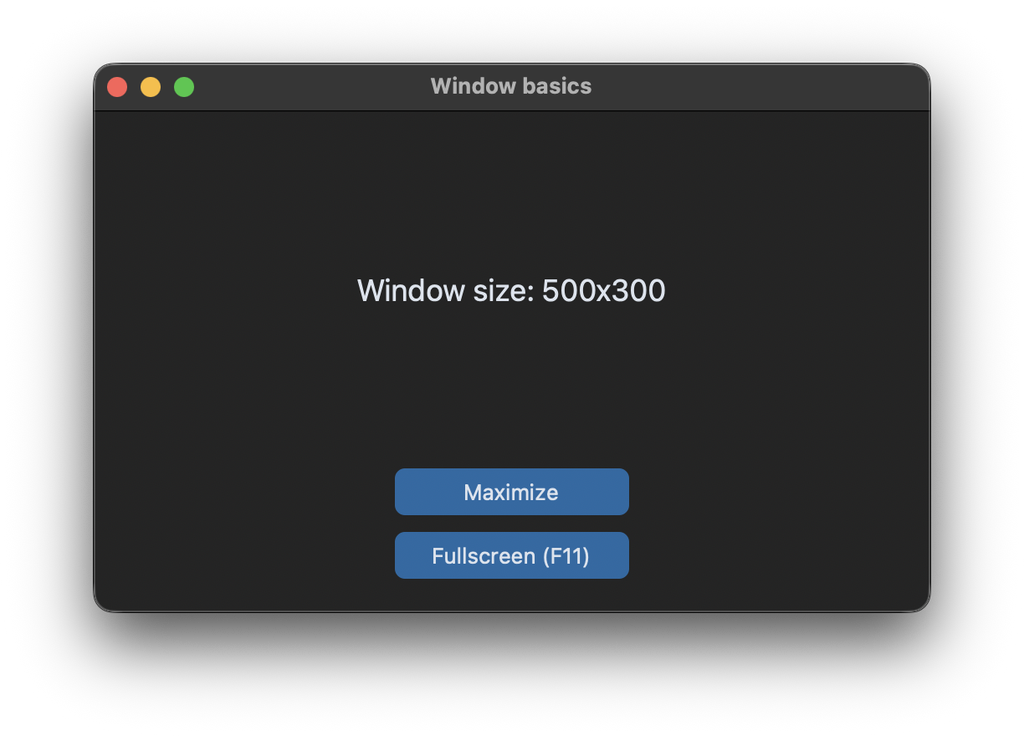
To show the current size of the window, we bind a function to the <Configure> event, which is called every time the window is moved or resized:
self.bind("<Configure>", self.update_size_label, add="+")
The argument add="+" is important here: CustomTkinter uses the <Configure> event of the window internally, and without add="+" our function would replace the internal one. The event is also called for every widget in the window, so we only react to events of the window itself:
    def update_size_label(self, event):
        if event.widget is self:
            size = self.geometry().split("+")[0]
            self.size_label.configure(text=f"Window size: {size}")
geometry() without an argument returns the current geometry string of the window, without scaling.
Full code
The program expects the files icon.ico and icon.png in a folder assets next to the script.
import os
import sys
import tkinter
import customtkinter

ASSETS = os.path.join(os.path.dirname(os.path.abspath(__file__)), "assets")


class App(customtkinter.CTk):
    def __init__(self):
        super().__init__()

        self.title("Window basics")
        self.minsize(400, 250)
        self.center_window(500, 300)
        self.set_icon()

        self.grid_columnconfigure(0, weight=1)
        self.grid_rowconfigure(0, weight=1)

        self.size_label = customtkinter.CTkLabel(self, text="", font=customtkinter.CTkFont(size=18))
        self.size_label.grid(row=0, column=0, padx=20, pady=20)

        self.maximize_button = customtkinter.CTkButton(self, text="Maximize", command=self.maximize)
        self.maximize_button.grid(row=1, column=0, padx=20, pady=(0, 10))

        self.fullscreen_button = customtkinter.CTkButton(self, text="Fullscreen (F11)",
                                                         command=self.toggle_fullscreen)
        self.fullscreen_button.grid(row=2, column=0, padx=20, pady=(0, 20))

        self.bind("<F11>", self.toggle_fullscreen)
        self.bind("<Escape>", self.exit_fullscreen)
        self.bind("<Configure>", self.update_size_label, add="+")

    def center_window(self, width, height):
        # geometry() expects the size without scaling, but the position in real screen pixels
        scaling = customtkinter.ScalingTracker.get_window_scaling(self)
        x = int((self.winfo_screenwidth() - width * scaling) / 2)
        y = int((self.winfo_screenheight() - height * scaling) / 2)
        self.geometry(f"{width}x{height}+{x}+{y}")

    def set_icon(self):
        if sys.platform.startswith("win"):
            self.iconbitmap(os.path.join(ASSETS, "icon.ico"))
        else:
            self.icon_image = tkinter.PhotoImage(file=os.path.join(ASSETS, "icon.png"))
            self.iconphoto(True, self.icon_image)

    def maximize(self):
        if sys.platform.startswith("linux"):
            self.attributes("-zoomed", True)
        else:
            self.state("zoomed")

    def toggle_fullscreen(self, event=None):
        self.attributes("-fullscreen", not self.attributes("-fullscreen"))

    def exit_fullscreen(self, event=None):
        self.attributes("-fullscreen", False)

    def update_size_label(self, event):
        if event.widget is self:
            size = self.geometry().split("+")[0]
            self.size_label.configure(text=f"Window size: {size}")


app = App()
app.mainloop()
The same methods also work for a CTkToplevel window. Before version 6.0, a custom icon on a CTkToplevel was replaced by the default icon on Windows shortly after the window was opened. If you still use an older version, set the icon with a delay: self.after(250, lambda: self.iconbitmap("icon.ico")).