3. Fonts
CTkFont
A font in CustomTkinter is a CTkFont object with the arguments family, size, weight ("normal" or "bold"), slant ("roman" or "italic"), underline and overstrike. Every argument that is not given is taken from the theme:
self.text_font = customtkinter.CTkFont(size=14)
self.code_font = customtkinter.CTkFont(family="Courier", size=14)
The size is given in pixels. It is multiplied with the scaling factor of CustomTkinter, so the text has the right size on HighDPI displays, see Scaling and High DPI. All arguments are described in the documentation of CTkFont.
A font can also be given as a tuple like ("Courier", 14, "bold"), but this font can't be changed later. A CTkFont object can be changed at any time with configure().
Share fonts between widgets
When a CTkFont object is used by several widgets and then changed with configure(), all these widgets are updated. This makes it easy to change the text size of the whole app, for example for users who need larger text:
SIZES = {"Small": (22, 12), "Medium": (28, 14), "Large": (34, 17)}

def change_size(self, size_name):
    heading_size, text_size = SIZES[size_name]
    self.heading_font.configure(size=heading_size)
    self.text_font.configure(size=text_size)
    self.code_font.configure(size=text_size)
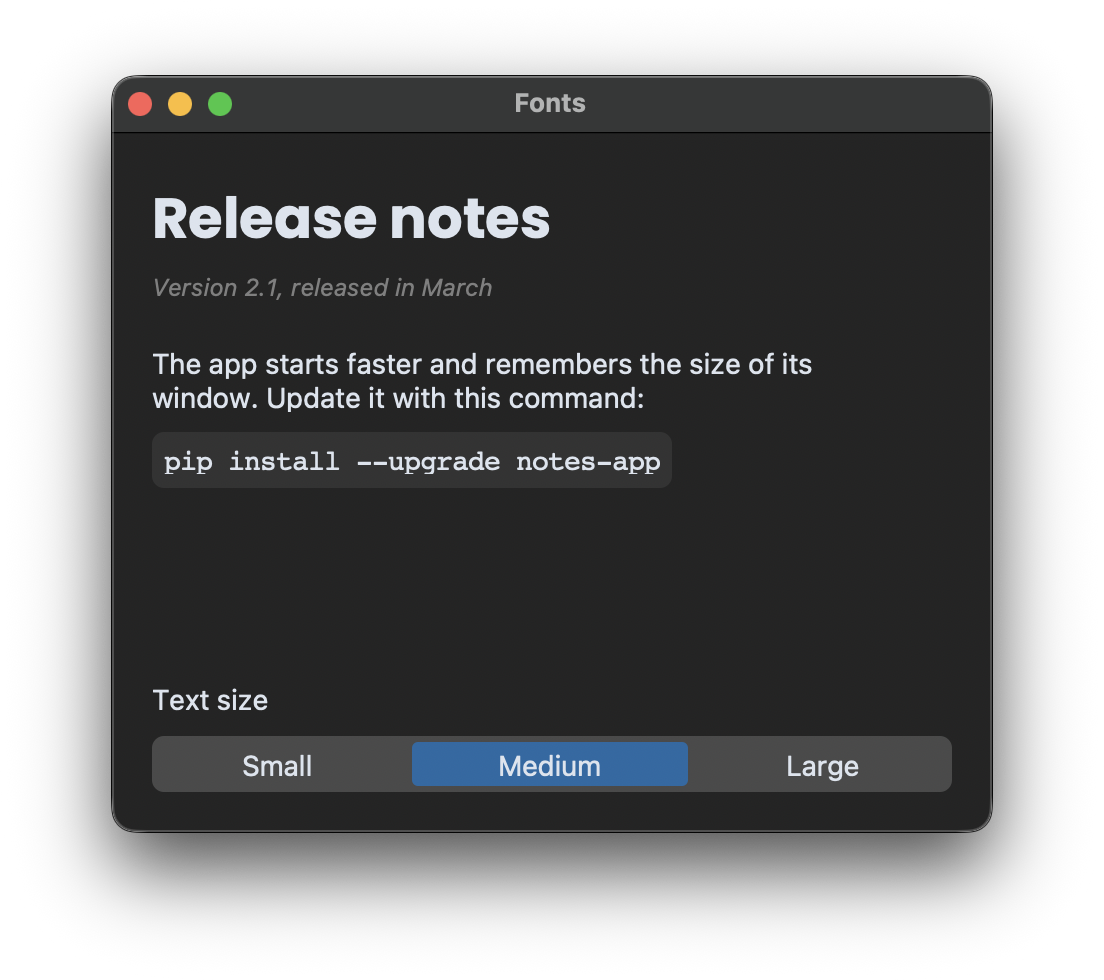
The date below the heading has its own font object that is not changed, so it keeps its size.
Load a font file
To use a font that is not installed on the system, load the font file when the program starts, before the window is created:
customtkinter.FontManager.load_font(os.path.join(ASSETS, "Poppins-Bold.ttf"))
The font in this example is Poppins from Google Fonts. Download it and put the file Poppins-Bold.ttf into a folder assets next to your script.
load_font() works on Windows and Linux and returns True if the font could be loaded. On macOS it does nothing and returns False, there the font has to be installed on the system. That's why the example checks if the font is available and uses the default font of the theme otherwise:
if "Poppins" in tkinter.font.families(self):
    heading_family = "Poppins"
else:
    heading_family = customtkinter.ThemeManager.theme["CTkFont"]["family"]
The family name is the name stored inside the font file, not the file name. tkinter.font.families() lists all names that can be used. Fonts with other weights like Light or SemiBold often have their own family name, for example "Poppins Light", because tkinter only knows the weights normal and bold.
Full code
import os
import tkinter.font
import customtkinter

ASSETS = os.path.join(os.path.dirname(os.path.abspath(__file__)), "assets")

# makes the font file usable for the app, works on Windows and Linux
customtkinter.FontManager.load_font(os.path.join(ASSETS, "Poppins-Bold.ttf"))

# font sizes for the heading and the text
SIZES = {"Small": (22, 12), "Medium": (28, 14), "Large": (34, 17)}


class App(customtkinter.CTk):
    def __init__(self):
        super().__init__()

        self.title("Fonts")
        self.geometry("440x350")
        self.grid_columnconfigure(0, weight=1)
        self.grid_rowconfigure(3, weight=1)

        # use Poppins if it could be loaded, otherwise the default font of the theme
        if "Poppins" in tkinter.font.families(self):
            heading_family = "Poppins"
        else:
            heading_family = customtkinter.ThemeManager.theme["CTkFont"]["family"]

        # each font object is shared by several widgets
        self.heading_font = customtkinter.CTkFont(family=heading_family, size=28, weight="bold")
        self.text_font = customtkinter.CTkFont(size=14)
        self.code_font = customtkinter.CTkFont(family="Courier", size=14)

        self.heading_label = customtkinter.CTkLabel(self, text="Release notes", font=self.heading_font)
        self.heading_label.grid(row=0, column=0, padx=20, pady=(20, 0), sticky="w")
        self.date_label = customtkinter.CTkLabel(self, text="Version 2.1, released in March",
                                                 font=customtkinter.CTkFont(size=12, slant="italic"),
                                                 text_color="gray50")
        self.date_label.grid(row=1, column=0, padx=20, pady=0, sticky="w")

        self.text_label = customtkinter.CTkLabel(self, font=self.text_font, justify="left", wraplength=380,
                                                 text="The app starts faster and remembers the size of its "
                                                      "window. Update it with this command:")
        self.text_label.grid(row=2, column=0, padx=20, pady=(15, 5), sticky="w")
        self.code_label = customtkinter.CTkLabel(self, text="pip install --upgrade notes-app", font=self.code_font,
                                                 fg_color=("gray85", "gray20"), corner_radius=6)
        self.code_label.grid(row=3, column=0, padx=20, pady=5, sticky="nw")

        self.size_label = customtkinter.CTkLabel(self, text="Text size", font=self.text_font)
        self.size_label.grid(row=4, column=0, padx=20, pady=(10, 0), sticky="w")
        self.size_button = customtkinter.CTkSegmentedButton(self, values=list(SIZES), font=self.text_font,
                                                            command=self.change_size)
        self.size_button.grid(row=5, column=0, padx=20, pady=(5, 20), sticky="ew")
        self.size_button.set("Medium")

    def change_size(self, size_name):
        heading_size, text_size = SIZES[size_name]
        # all widgets that use these fonts are updated
        self.heading_font.configure(size=heading_size)
        self.text_font.configure(size=text_size)
        self.code_font.configure(size=text_size)


app = App()
app.mainloop()
Default font of all widgets
Widgets without a font argument use the default font of the theme. In a theme file it is set in the section CTkFont. The built-in themes have one value for each operating system, a section with only one value is used on all systems:
"CTkFont": {
  "family": "Poppins",
  "size": 14,
  "weight": "normal"
}
How to create a theme file is explained in Colors and Custom Themes. Without a theme file, the values can also be changed in the loaded theme, before the first widget is created:
customtkinter.ThemeManager.theme["CTkFont"]["size"] = 16
Common errors
The font is not used
Check the family name with "Poppins" in tkinter.font.families(). If the name is not in the list, the font file was not loaded, or the family has another name than the file. On macOS fonts from a file have to be installed on the system.
AttributeError: 'tuple' object has no attribute 'configure'
The widget got its font as a tuple, which can't be changed. Create a CTkFont object instead.
_tkinter.TclError: expected integer but got "-14.5"
The size of a font must be a whole number. Use round() when the size is calculated.