2. Markers
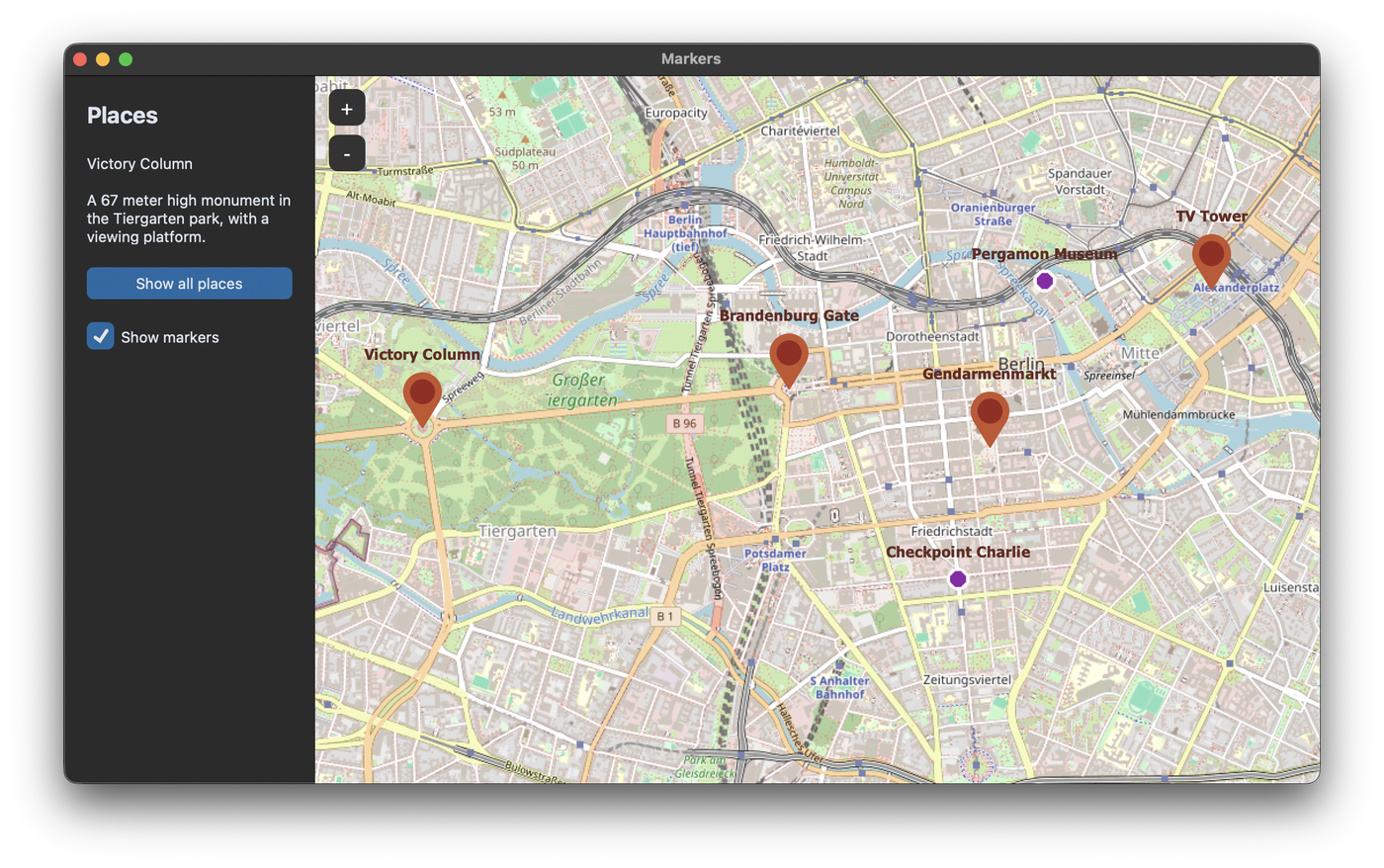
Set a marker
set_marker places a marker at a position and returns the marker object. The text is shown above the marker:
marker = self.map_widget.set_marker(52.516268, 13.377695, text="Brandenburg Gate")
The colors and the font can be changed with marker_color_circle, marker_color_outside, text_color and font:
marker = self.map_widget.set_marker(52.516268, 13.377695, text="Brandenburg Gate",
                                    marker_color_circle="white", marker_color_outside="#1F6AA5",
                                    text_color="#1F6AA5", font=("Arial", 14, "bold"))
In this tutorial we create a map of some places in Berlin. Every place is a dictionary with a name, a position, a type and a short text:
PLACES = [
    {"name": "Brandenburg Gate", "position": (52.516268, 13.377695), "type": "sight",
     "info": "Built from 1788 to 1791, today a symbol of German reunification."},
    ...
]
Click on a marker
A marker gets a function with command, which is called with the marker as argument when the marker is clicked. With data you can attach anything to the marker, here the dictionary of the place. In the click function, marker.data gives you the place back:
marker = self.map_widget.set_marker(*place["position"], text=place["name"], data=place,
                                    command=self.marker_clicked)

    def marker_clicked(self, marker):
        place = marker.data  # the dictionary we passed with data=
        self.info_label.configure(text=f"{place['name']}\n\n{place['info']}")
Own icons
Instead of the default marker, a marker can show an icon with the icon argument. The icon is a tkinter.PhotoImage or a PIL.ImageTk.PhotoImage. In this example the icon is drawn with Pillow, so we don't need an image file:
def circle_icon(color, size=22):
    """Draws a round marker icon, so we don't need an image file for it."""
    image = Image.new("RGBA", (size, size), (0, 0, 0, 0))
    ImageDraw.Draw(image).ellipse((1, 1, size - 2, size - 2), fill=color, outline="white", width=3)
    return ImageTk.PhotoImage(image)

self.museum_icon = circle_icon("#8E24AA")
The icon must be stored in an attribute like self.museum_icon. If it is only a local variable, Python deletes the image and the marker stays empty. With icon_anchor you set which point of the icon is placed at the position, for example "s" for the bottom center of a pin icon. The default is "center".
Image above the marker
With the image argument, a marker shows an image above it. image_zoom_visibility sets the zoom levels at which the image is visible, so the map doesn't get too full when it is zoomed out:
marker = self.map_widget.set_marker(52.520815, 13.409419, text="TV Tower", image=self.logo_image,
                                    image_zoom_visibility=(16, float("inf")))
Change and delete markers
The marker object has methods to change it later:
marker.set_position(52.5200, 13.4050)
marker.set_text("new text")
marker.change_icon(new_icon)  # only for markers that were created with an icon
marker.hide_image(True)
marker.delete()
self.map_widget.delete_all_marker() deletes all markers of the map. The list of current markers is in self.map_widget.canvas_marker_list.
Show all markers
To show all places at once, we calculate the corners of the area that contains all positions and pass them to fit_bounding_box:
    def show_all(self):
        latitudes = [place["position"][0] for place in self.places]
        longitudes = [place["position"][1] for place in self.places]
        # top left and bottom right corner of the area with all places
        self.map_widget.fit_bounding_box((max(latitudes), min(longitudes)), (min(latitudes), max(longitudes)))
Full code
The program expects the image CustomTkinter_logo_single.png from the CustomTkinter examples in a folder assets next to the script.
import os
import customtkinter
import tkintermapview
from PIL import Image, ImageDraw, ImageTk

ASSETS = os.path.join(os.path.dirname(os.path.abspath(__file__)), "assets")

PLACES = [
    {"name": "Victory Column", "position": (52.514507, 13.350110), "type": "sight",
     "info": "A 67 meter high monument in the Tiergarten park, with a viewing platform."},
    {"name": "Brandenburg Gate", "position": (52.516268, 13.377695), "type": "sight",
     "info": "Built from 1788 to 1791, today a symbol of German reunification."},
    {"name": "Gendarmenmarkt", "position": (52.513611, 13.392778), "type": "sight",
     "info": "A square with the concert hall and two churches."},
    {"name": "Pergamon Museum", "position": (52.521183, 13.396912), "type": "museum",
     "info": "One of the museums on Museum Island."},
    {"name": "TV Tower", "position": (52.520815, 13.409419), "type": "sight",
     "info": "368 meters high, the tallest structure in Germany."},
    {"name": "Checkpoint Charlie", "position": (52.507541, 13.390374), "type": "museum",
     "info": "Former border crossing between East and West Berlin, with a museum."},
]


def circle_icon(color, size=22):
    """Draws a round marker icon, so we don't need an image file for it."""
    image = Image.new("RGBA", (size, size), (0, 0, 0, 0))
    ImageDraw.Draw(image).ellipse((1, 1, size - 2, size - 2), fill=color, outline="white", width=3)
    return ImageTk.PhotoImage(image)


class App(customtkinter.CTk):
    def __init__(self):
        super().__init__()

        self.title("Markers")
        self.geometry("1100x620")
        self.grid_columnconfigure(1, weight=1)
        self.grid_rowconfigure(0, weight=1)

        self.places = PLACES
        self.markers = []

        # images must be kept in an attribute, otherwise Python deletes them and the markers stay empty
        self.museum_icon = circle_icon("#8E24AA")
        self.logo_image = ImageTk.PhotoImage(
            Image.open(os.path.join(ASSETS, "CustomTkinter_logo_single.png")).resize((60, 60)))

        self.side_frame = customtkinter.CTkFrame(self, width=220, corner_radius=0)
        self.side_frame.grid(row=0, column=0, sticky="nsew")
        self.side_frame.grid_propagate(False)
        self.side_frame.grid_columnconfigure(0, weight=1)

        self.title_label = customtkinter.CTkLabel(self.side_frame, text="Places",
                                                  font=customtkinter.CTkFont(size=20, weight="bold"))
        self.title_label.grid(row=0, column=0, padx=20, pady=(20, 10), sticky="w")
        self.info_label = customtkinter.CTkLabel(self.side_frame, text="Click on a marker.", wraplength=180,
                                                 justify="left", anchor="w")
        self.info_label.grid(row=1, column=0, padx=20, pady=10, sticky="ew")
        self.show_all_button = customtkinter.CTkButton(self.side_frame, text="Show all places",
                                                       command=self.show_all)
        self.show_all_button.grid(row=2, column=0, padx=20, pady=10, sticky="ew")
        self.markers_checkbox = customtkinter.CTkCheckBox(self.side_frame, text="Show markers",
                                                          command=self.toggle_markers)
        self.markers_checkbox.grid(row=3, column=0, padx=20, pady=10, sticky="w")
        self.markers_checkbox.select()

        self.map_widget = tkintermapview.TkinterMapView(self, corner_radius=0)
        self.map_widget.grid(row=0, column=1, sticky="nsew")

        self.create_markers()
        self.map_widget.set_position(52.5144, 13.3798)
        self.map_widget.set_zoom(14)

    def create_markers(self):
        for place in self.places:
            options = {}
            if place["type"] == "museum":
                options["icon"] = self.museum_icon
            if place["name"] == "TV Tower":
                # an image above the marker, only visible from zoom level 16
                options["image"] = self.logo_image
                options["image_zoom_visibility"] = (16, float("inf"))

            marker = self.map_widget.set_marker(*place["position"], text=place["name"], data=place,
                                                command=self.marker_clicked, **options)
            self.markers.append(marker)

    def marker_clicked(self, marker):
        place = marker.data  # the dictionary we passed with data=
        self.info_label.configure(text=f"{place['name']}\n\n{place['info']}")

    def toggle_markers(self):
        if self.markers:
            for marker in self.markers:
                marker.delete()
            self.markers = []
        else:
            self.create_markers()

    def show_all(self):
        latitudes = [place["position"][0] for place in self.places]
        longitudes = [place["position"][1] for place in self.places]
        # top left and bottom right corner of the area with all places
        self.map_widget.fit_bounding_box((max(latitudes), min(longitudes)), (min(latitudes), max(longitudes)))


app = App()
app.mainloop()
Common errors
The icon or image of a marker is not shown
The PhotoImage was deleted by Python, because it was only stored in a local variable. Keep a reference, for example in an attribute of the window.
AttributeError: CanvasPositionMarker: marker needs icon image in constructor to change icon image later
change_icon only works for markers that were created with an icon. Delete the marker and create a new one with an icon instead.